vbFindInList NO API
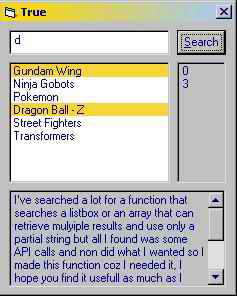
This searches for a string in a listbox, it can retrieve multiple results and can use only partial string..
Inputs
The string to search for, and the listbox to search in.
Assumes
Non
Returns
True if found, and it highlights the list items that contains the search criteria.
Side Effects
Non
API Declarations'This is how it's done the EASY WAY, No API declarations required..suitable for small to medium lists...enjoy..
Function vbFind(vbString As String, vbList As ListBox, Optional iStart As Integer) As Boolean
Dim vbWhere As String
vbFind = False
If iStart < 0 Then iStart = 0
If vbString <> "" Then
For i = iStart To vbList.ListCount - 1
vbString = LCase(vbString)
vbWhere = LCase(vbList.List(i))
If InStr(1, vbWhere, vbString) > 0 Then
vbFind = True
Debug.Print (i)
vbList.Selected(i) = True
iStart = i + 1
End If
Next i
End If
If vbFind = False Then MsgBox "Search string not found, Please make sure that you've entered the file name correctly and try again.", vbCritical, "Error"
End Function
 (11(11 Vote))