AB-Software - VbEclipse Project
http://www.ab-software.com
Freeware Version 0.8.97
All 32-bit MS Windows Operating Systems
(95/98/NT/2000/XP)
NEW UPDATE AVAILABLE
A new update of VbEclipse is available.
PLEASE LOOK AND VOTE
AT:
http://www.pscode.com/vb/scripts/ShowCode.asp?txtCodeId=58641&lngWId=1
DESCRIPTION
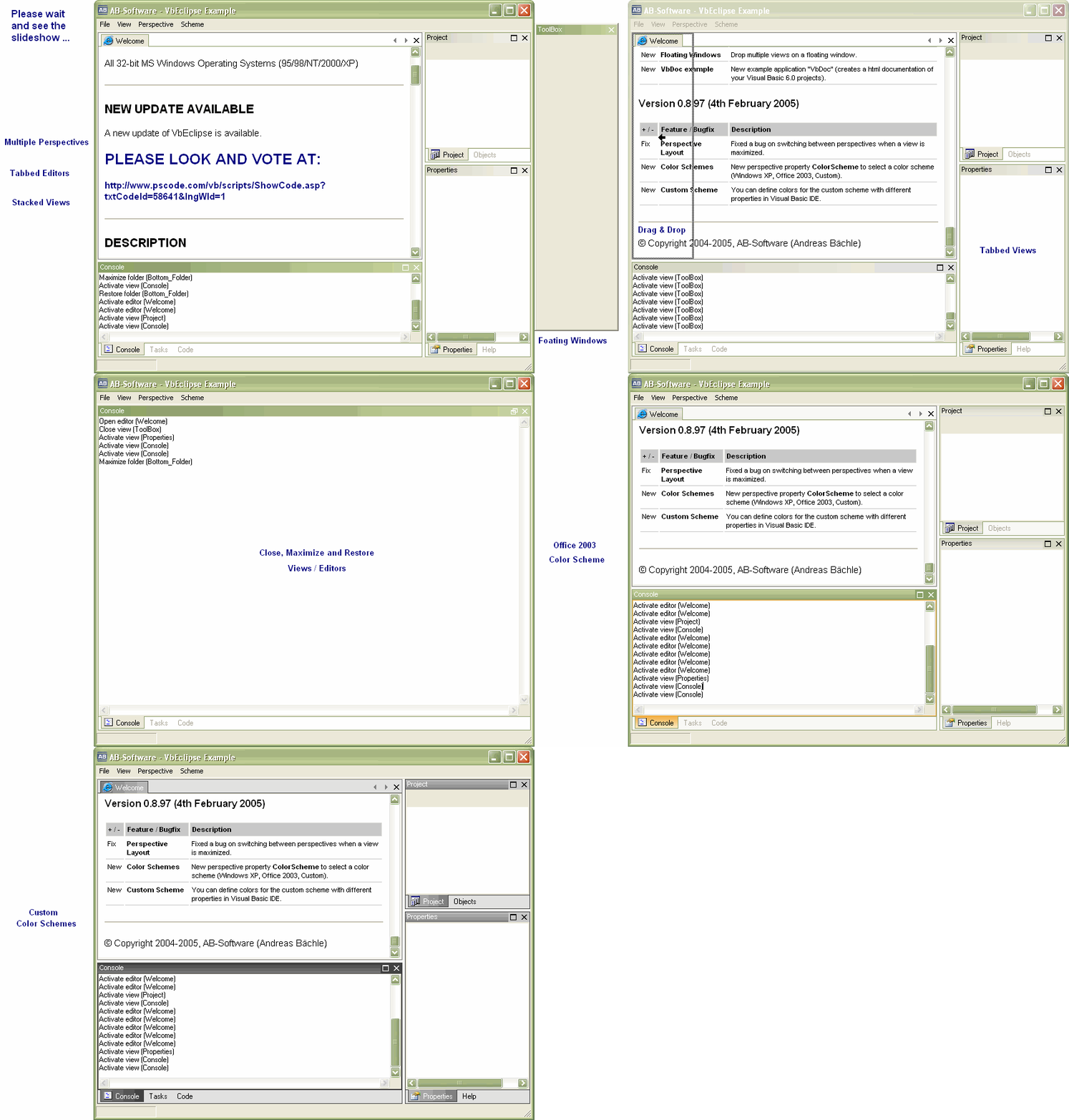
The VbEclipse project is a Visual Basic 6.0 implementation
of the Eclipse perspectives. It provides a high flexible and
complete configurable docking MDI solution with a nice user
interface.
At work I'm developing Java with the open source Eclipse 3.0
IDE (see www.eclipse.org). This IDE works with perspectives,
which gives the developer different views on his source.
If the developer is simply coding Java, he will do this in
the java perspective. This perspective has some views like
project explorer, tasks, ... But if you are debugging the
source, Eclipse switches to the debug perspective. Here you can
see other views like breakpoints, variables or the running
tasks.
The user will automaticlly see only the views he really
needs for his current work. Cause I like this concept, I was
inspired to implement this possibility for Visual Basic
developers. And this is also the final goal for this
project.
But you can do more with this Control than just create IDE
apps. Just have a look at the "VbDoc" example in the download
and see how simply it is to work with perspectives and which
surplus values you get.
Thanks for your interest on my work.
PLEASE VOTE IF YOU LIKE IT :o)
FEATURE HISTORY
Version 0.3.x (December 2004)
| + / - |
Feature / Bugfix |
Description |
| + |
Perspectives |
Different sets of layouted views (forms) to switch
between different perspectives. Perspectives descripe the
presentation of theire views. |
| + |
Views |
Views are representing simple Visual Basic standard
forms and could be accessed by a unique view id. Note thar
there could only be one view instance visible on each
perspective. When the user changes the perspective, no view
will be unloaded. Only the position and the visibility of
views will be changed. So if the user switches back to the
first perspective the layout will not be lost or
reset. |
| + |
Folders |
Views are layouted on the perspective by folders. The
sense of a folder is to provide the ability to show views
stacked together with other views. There is only one view
visible for each folder. The visible view could be canged
by tabs. |
| + |
View Handling |
Show, activate and close views on
the active perspective by theire id. You can also
maximize and restore views / editors. |
| + |
Drag & Drop |
Drag a view while press and hold the left mouse button
on views caption. If you hold the button a while (500 ms) a
focus rectangle will appear. Now you can select an other
folder to drop the view by releasing the mouse button. You
can also create new folders if you drop the view on the
top, left, bottom or right of a folder. The new folder will
appear in the relation you drop the view. |
| + |
Office 2003 Color Scheme |
This scheme has different color styles for
classic, metallic (silver), homestead
(olive) and normal (blue) mode. |
| + / - |
Feature / Bugfix |
Description |
| + |
New Color Scheme |
New Windows XP Color Scheme as a replacement for the
Office 2003 Color Scheme. |
| + |
Custom Color Schemes |
Developers can set custom colors by IScheme
interface. |
| + |
Editors |
Open, Activate, Close |
| + |
Folder Captions |
Folders now have a caption which shows the name of the
open view. |
| + |
Floating Windows |
If you drop a view to the outside of the perspective a
floating window will apear. |
| + |
Auto Hide Folder Tabs |
The folders tabs are invisible if there is only one
view on it. |
| + |
Tabs Orientation |
For better distinguish between folders and the editor
area the following tab orientation were set:
- The orientation of the folder tabs changed to
bottom orientation.
- The orientation of the editor area tabs changed to
top orientation.
|
| + |
Editor Tabs Orientation |
The orientation of the editor area tabs changed to top
orientation. |
| - |
Flicker effects |
I reduced the flickering on resize a perspective by a
new rendering method. |
| - |
Performence |
Optimized Performence on layouting perspectives. |
| - |
Folders |
Refresh Layout after remove a maximized folder
(fixed). |
| - |
ShowView() Methode |
ShowView creates a new folder if perspective has none
(fixed). |
 (2(2 Vote))