VB Subs/Functions Database
Automatically creates the Database of all VB Subs/Functions/Folders/Files on your computer
Assumes
This program allows to create the Database of all VB Subs/Functions/Folders/Files on your computer.
You can view, find and manipulate with Forms, Modules, Subs and Functions and create new modules from the subs and functions you already have.
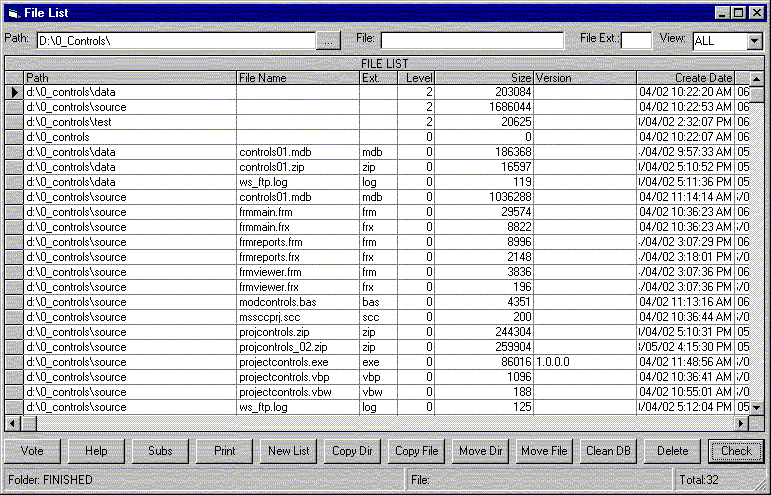
First step is to create database of all files. Enter Path (For example: C:\ ) and press Check button.
If Program failed most likely you have corrupted file (The file path could be found in c:\LastFile.txt file). Try to look at properties of this file, delete or move it and start program again. After several iterations Database will be created. It could take up to 20-30 minutes to complete the job.
After Database of folders and files was created you can do the following:
Select by File/Folder Path (Put Folder/File/File Ext. path and hit Enter)
Select by File Name
Select by File Extension
Order Selected Folders/Files by Path (Click on Grid Header)
Order Selected Folders/Files by Name
Order Selected Folders/Files by Suffix
Order Selected Folders/Files by Level
Order Selected Folders/Files by Size
Order Selected Folders/Files by Version
Move File
Move Folder
Copy File
Copy Folder
Delete File
Print the List of selected Folders/Files
Open several File List windows (I usually use this mode for DLL/OCX/EXE file size version check)
Now you are ready to start creating list of subs and functions you have in all files. Press Subs button and after that Check button on Subs and Functions form. Program automatically looks through the list of all VB files found on your computer and creates the list of Subs and Functions from all these files.
It could take another 10-20 minutes. Depending on the number of VB files.
After the list of Subs and Folders will be created you can start manipulating with these files.
To Find File /Folder/Sub just type in the name in appropriate field and hit ENTER.
To Order by selected column click on the Column Header.
To Extract the Sub/Function hit View Sub
To Add extracted Sub/Function to the File hit Add Sub (Make sure that the file Path was defined)
To View result file with all added Subs/Functions hit View Res button.
As a bonus in modFSO module you'll find most of the functions and subs required for Disk/Folder/File manipulations.
Do not forget to add reference to Microsoft Scripting Runtime (scrrun.dll) in the project.
Good luck and all the best.
 (8(8 Vote))