User account editor for the computerized test taker
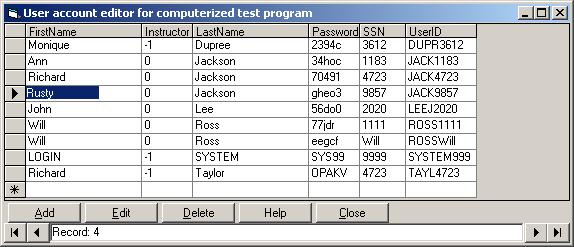
This code goes hand in hand with the computerized test taker. It allows people without microsoft access an easier way to edit user passwords, login names, and other things like the persons name and the SSN. I actualy use this more than microsoft access to edit the database because it makes it so easy to add, delete, and change the user accounts. SOON TO COME:a program like this but shows you all the test info such the person's userID, score, testname, and time and date of test taken. Keep your eyes open.
Assumes
To use this code, your database (login.mdb) and other computerized test taking files must be located in: C:\program Files\Computerized Test Taker\
Rate User account editor for the computerized test taker
 (4(4 Vote))
(4(4 Vote))
Download User account editor for the computerized test taker
Active Server Pages
Coding Standards
Complete Applications
Custom Controls
Data Structures
Databases / ADO
DDE
Debugging & Errors
DirectX
Encryption
Files / I/O
Games
Graphics
Internet / HTML
Jokes / Humor
Libraries
Math / Dates
Office / VBA
Miscellaneous
OOP
OLE / COM / ActiveX
Registry
Sound / MP3
String Manipulation
VB Enhancements
Windows API
Windows CE
System Services