Tricks with menu UPDATED
Filip Wielewski
(5 Submissions)
Windows API Call/Explanation
Visual Basic 5.0
Intermediate
Wed 3rd February 2021
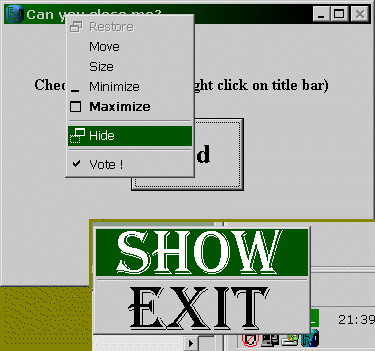
This code shows how to use many API functions in "menu" category (see the screen shot!). Viewing this code you can learn how to disable close (x) button on title bar, how to edit system menu (minimize, maximize, close, etc.) of specified window, how to remove items from menu, add small bitmaps next to the text in menu items, get handle to system menu, menu of window and submenu, add as big bitmap as you want to menu item, hide menu on command and count menu items. It also shows how to use window procedure (called by AddressOf), how to hide your application and add icon to taskbar status area and how to open internet pages without using any controls. UPDATED: now you can add to menu also icons!
Rate Tricks with menu UPDATED
 (6(6 Vote))
(6(6 Vote))
Download Tricks with menu UPDATED
Active Server Pages
Coding Standards
Complete Applications
Custom Controls
Data Structures
Databases / ADO
DDE
Debugging & Errors
DirectX
Encryption
Files / I/O
Games
Graphics
Internet / HTML
Jokes / Humor
Libraries
Math / Dates
Office / VBA
Miscellaneous
OOP
OLE / COM / ActiveX
Registry
Sound / MP3
String Manipulation
VB Enhancements
Windows API
Windows CE
System Services