Tray Drink
Networking.be
(10 Submissions)
Complete Applications
Visual Basic 3.0
Beginner
Wed 3rd February 2021
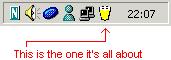
This doesn't do much, it just shows a drink in your system tray. As you will notice, the drink will get empty as time goes by. Right clicking the drink will enable you to configure the drinking speed, and of course the drink. I've included beer, wine and milk, but drinks can be added by creating your own set of icons, createing a folder in the icons dirctory, and adding icons called 100, 75, 50, 25, 0 and !. Nothing fancy, just for fun! Could be inplemented in your own application (again, just for fun)
Rate Tray Drink
 (3(3 Vote))
(3(3 Vote))
Download Tray Drink
Active Server Pages
Coding Standards
Complete Applications
Custom Controls
Data Structures
Databases / ADO
DDE
Debugging & Errors
DirectX
Encryption
Files / I/O
Games
Graphics
Internet / HTML
Jokes / Humor
Libraries
Math / Dates
Office / VBA
Miscellaneous
OOP
OLE / COM / ActiveX
Registry
Sound / MP3
String Manipulation
VB Enhancements
Windows API
Windows CE
System Services