Time Synchronizer
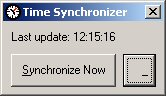
This program will synchronize the system's time with an atomic time server every hour. While the program uses the atomic clock in Berlin, a user defined NTP server can be specified inside "settings.txt".
You can also minimize the program to the system tray. A left button double click will restore the application, a right button double click will close it. After a Windows Explorer crash, the tray icon will be automatically restored.
Side Effects
Possible errors might occur when the DST settings between server and client differ.
API DeclarationsCallWindowProc
RegisterWindowMessage
SetWindowLong
Shell_NotifyIcon
Rate Time Synchronizer
 (3(3 Vote))
(3(3 Vote))
Download Time Synchronizer
Active Server Pages
Coding Standards
Complete Applications
Custom Controls
Data Structures
Databases / ADO
DDE
Debugging & Errors
DirectX
Encryption
Files / I/O
Games
Graphics
Internet / HTML
Jokes / Humor
Libraries
Math / Dates
Office / VBA
Miscellaneous
OOP
OLE / COM / ActiveX
Registry
Sound / MP3
String Manipulation
VB Enhancements
Windows API
Windows CE
System Services