Subforms in VB UPDATED
Subforms in VB UPDATED!!!!
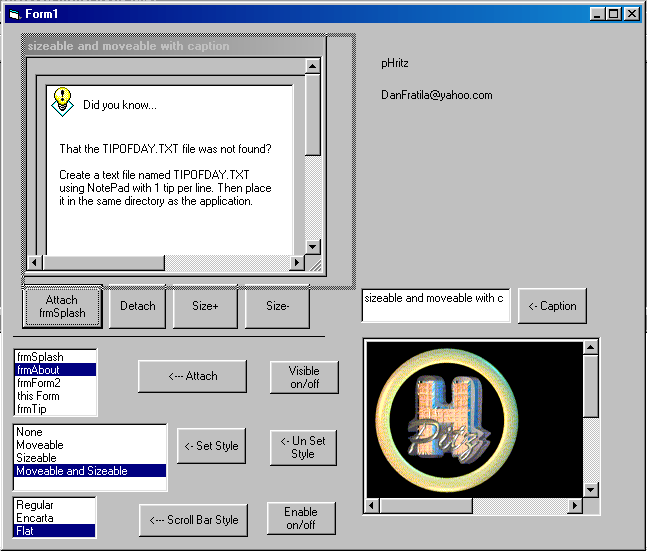
This OCX allows you to set any one form in your project as a parent form and display all other forms within the project as a subform within a client area of the parent form. A demo client project within a .vbg is included (run_this.vbg). Register the .ocx using regsvr32 first.
Major news:
User control with CAPTION
User control MOVEABLE at runtime
User control SIZEABLE at runtime
Change the ATTACHED Window Style
Event GetAttachedWindowStyle(ByRef NewStyle As Long)
(you can set your own Attached Window Style)
Event NewStyle(ByVal PropertyName As String, ByVal newValue As Boolean)
Assumes
Seven Interface Definition
General Information
Library: Seven (Seven)
File: SUBFORMCTL\Seven.ocx
Version: 1.1.0
Enumerations
This section lists enumerations exposed by Seven.
Public Enum EMsgResponse
emrConsume=0
emrPostProcess=1
emrPreprocess=2
End Enum
Public Enum ScrollStyleConstants
efsRegular=0
efsEncarta=1
efsFlat=2
End Enum
Public Enum sfAttachedWindowStyle
sfOriginalStyle=0
sfSubformStyle=1
sfCustomStyle=2
End Enum
Interfaces
This section lists the Classes exposed by Seven. For each class, the methods and events are listed.
SubForm
Methods
Sub AttachForm(ByVal frm As Object, Optional ByVal AttachedWindowNewStyle As sfAttachedWindowStyle=1) -update
Sub DetachForm
Function isEmpty() As Boolean
Property Get Moveable() As Boolean - new
Property Let Moveable(RHS As Boolean) - new
Property Get Sizeable() As Boolean - new
Property Let Sizeable(RHS As Boolean) - new
Property Get Caption() As String - new
Property Let Caption(RHS As String) - new
Property Get ScrollBarStyle() As ScrollStyleConstants
see Steve McMahon ([email protected]) cScrollBars
Property Let ScrollBarStyle(RHS As ScrollStyleConstants)
see Steve McMahon ([email protected]) cScrollBars
Property Get Enabled() As Boolean
Returns/sets a value that determines whether an object can respond to user-generated events.
Property Let Enabled(RHS As Boolean)
Returns/sets a value that determines whether an object can respond to user-generated events.
Property Get BackColor() As ULong
Returns/sets the background color used to display text and graphics in an object.
Property Let BackColor(RHS As ULong)
Returns/sets the background color used to display text and graphics in an object.
Property Get Picture() As Picture
Returns/sets a graphic to be displayed in a control.
Property Set Picture() As Picture
Returns/sets a graphic to be displayed in a control.
Events
Public Event AfterAttach(ByVal FormName As String, ByVal FormWidth As Long, ByVal FormHeight As Long)
Public Event Scroll(ByVal isHorizontalBar As Boolean)
Public Event ScrollBarChange(ByVal isHorizontalBar As Boolean) -update
Public Event GetAttachedWindowStyle(ByVal NewStyle As Long) -new
Public Event NewStyle(ByVal PropertyName As String, ByVal newValue As Boolean) -new
GSubclass
Methods
Sub AttachMessage(ByVal iwp As _ISubclass, ByVal hwnd As Long, ByVal iMsg As Long)
Start subclassing for a particular message.
Sub DetachMessage(ByVal iwp As _ISubclass, ByVal hwnd As Long, ByVal iMsg As Long)
Stop subclassing for a particular message.
Property Get CurrentMessage() As Long
Returns the message currently being worked on. Only valid in the MsgResponse and WindowProc items of your implemented interface.
Function CallOldWindowProc(ByVal hwnd As Long, ByVal iMsg As Long, ByVal wParam As Long, ByVal lParam As Long) As Long
Calls the window procedure for this handle which was installed before you added the subclass.
Events
None
ISubclass
Methods
Property Get MsgResponse() As EMsgResponse
Get/set how you will respond to a message. Raised whenever a message is encountered. Call the CurrentMessage property to determine what message you are currently responding to.
Property Let MsgResponse(RHS As EMsgResponse)
Get/set how you will respond to a message. Raised whenever a message is encountered. Call the CurrentMessage property to determine what message you are currently responding to.
Function WindowProc(ByVal hwnd As Long, ByVal iMsg As Long, ByVal wParam As Long, ByVal lParam As Long) As Long
Raised whenever a message you have subclassed is sent.
Events
None
API DeclarationsPrivate Const GWL_STYLE = (-16)
Private Const WS_CAPTION = &HC00000 ' WS_BORDER Or WS_DLGFRAME
Private Const WS_SYSMENU = &H80000
Private Const WS_THICKFRAME = &H40000
Private Const WM_SETTEXT = &HC
Private Const WM_MOVE = &H3
Private Const WM_SIZE = &H5
Private Const WM_SIZING = &H214
Private Type RECT
left As Long
top As Long
right As Long
bottom As Long
End Type
Private Type SIZE
cX As Long
cY As Long
End Type
Private Enum ESetWindowPosStyles 'Slimy Windows Hacks'
SWP_SHOWWINDOW = &H40
SWP_HIDEWINDOW = &H80
SWP_FRAMECHANGED = &H20 ' The frame changed: send WM_NCCALCSIZE
SWP_NOACTIVATE = &H10
SWP_NOCOPYBITS = &H100
SWP_NOMOVE = &H2
SWP_NOOWNERZORDER = &H200 ' Don't do owner Z ordering
SWP_NOREDRAW = &H8
SWP_NOREPOSITION = SWP_NOOWNERZORDER
SWP_NOSIZE = &H1
SWP_NOZORDER = &H4
SWP_DRAWFRAME = SWP_FRAMECHANGED
HWND_NOTOPMOST = -2
End Enum
Private Declare Function SetParent Lib "user32" (ByVal hWndChild As Long, ByVal hWndNewParent As Long) As Long
Private Declare Function GetWindowRect Lib "user32" (ByVal hwnd As Long, lpRect As RECT) As Long
Private Declare Function GetClientRect Lib "user32" (ByVal hwnd As Long, lpRect As RECT) As Long
Private Declare Function MoveWindow Lib "user32" (ByVal hwnd As Long, ByVal X As Long, ByVal Y As Long, ByVal nWidth As Long, ByVal nHeight As Long, ByVal bRepaint As Long) As Long
Private Declare Function GetWindowLong Lib "user32" Alias "GetWindowLongA" (ByVal hwnd As Long, ByVal nIndex As Long) As Long
Private Declare Function SetWindowLong Lib "user32" Alias "SetWindowLongA" (ByVal hwnd As Long, ByVal nIndex As Long, ByVal dwNewLong As Long) As Long
Private Declare Function SetWindowPos Lib "user32" (ByVal hwnd As Long, ByVal hWndInsertAfter As Long, ByVal X As Long, ByVal Y As Long, ByVal cX As Long, ByVal cY As Long, ByVal wFlags As Long) As Long
Private Declare Sub CopyMemory Lib "kernel32" Alias "RtlMoveMemory" (Destination As Any, Source As Any, ByVal Length As Long)
Private Declare Function SendMessage Lib "user32" Alias "SendMessageA" (ByVal hwnd As Long, ByVal wMsg As Long, ByVal wParam As Long, lParam As Any) As Long
 (7(7 Vote))