String Auto Backspace
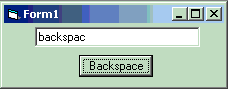
With this extremely easy code, you can erase a character at the end of a string or in a textbox with a click of a button. Very easy code and every line is commented. DON'T forget to vote.
API DeclarationsDim backlength As Integer
Dim backString As String
Rate String Auto Backspace
 (5(5 Vote))
(5(5 Vote))
Active Server Pages
Coding Standards
Complete Applications
Custom Controls
Data Structures
Databases / ADO
DDE
Debugging & Errors
DirectX
Encryption
Files / I/O
Games
Graphics
Internet / HTML
Jokes / Humor
Libraries
Math / Dates
Office / VBA
Miscellaneous
OOP
OLE / COM / ActiveX
Registry
Sound / MP3
String Manipulation
VB Enhancements
Windows API
Windows CE
System Services