SQL Server Object Documentation
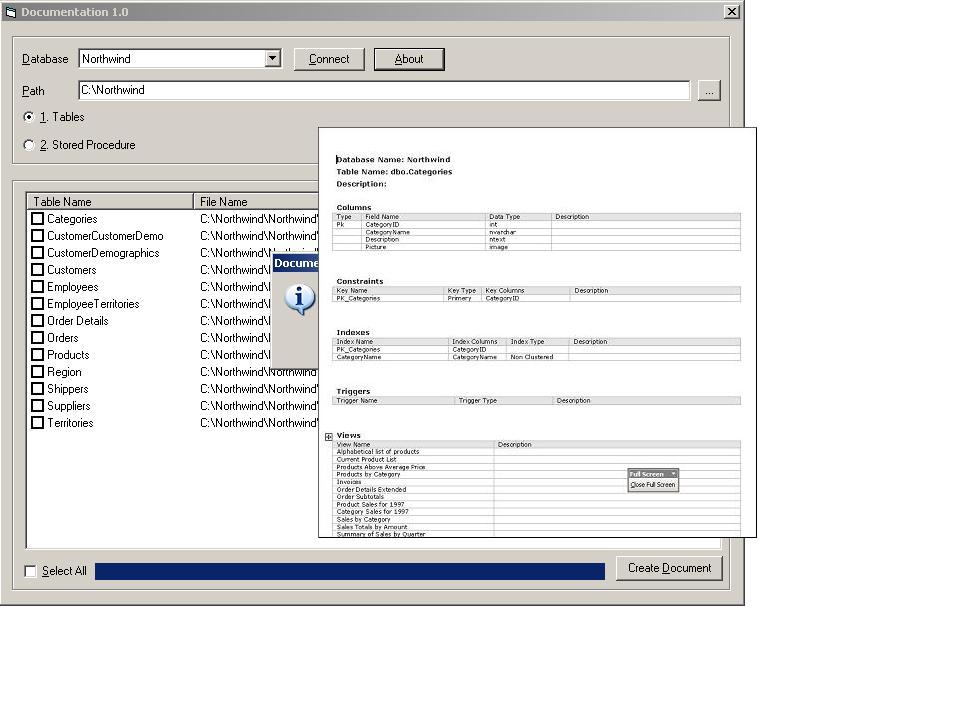
Used to Document a SQL Server Database.
Login
Select the Database to document.
Select the Path at which the documents (.doc) will be created. Just select the primery location, the application will create the folder with the database name.
Select the objects to document.
Click the Create Document Button.
The application uses SQL-DMO to document Tables and Stored Procedures of a selected SQL Server 2000 database.
The application creates .doc files for each selected SQL Server object(Table/Stored Procedure), and writes varied information about the object to the .doc file. (Required MS Word).
The application also maintains the last selected information.
Assumes
Needs MS Word and MS SQL Server 2000.
Returns
The application creates .doc files for each selected SQL Server object(Table/Stored Procedure), and writes varied information about the object to the .doc file. (Required MS Word).
API DeclarationsSHBrowseForFolder
GetPrivateProfileString
WritePrivateProfileString
Sleep
ShellExecute
 (7(7 Vote))