SpeakingHead.OCX
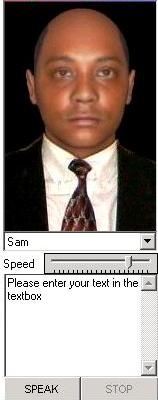
SpeakingHead.ocx is a control for text to speech with facial animation. At present, it only supports SAPI 4, but an upgrade is on its way (provided there is enough votes to inspire me :)
Assumes
Open the project, compile it, and copy the ocx to your system directory. Open a new project in vb then Goto project->components->browse (for the ocx),click apply. Add the ocx to your form. That's ALL. Alternatively, run the project as is.
Rate SpeakingHead.OCX
 (4(4 Vote))
(4(4 Vote))
Download SpeakingHead.OCX
Active Server Pages
Coding Standards
Complete Applications
Custom Controls
Data Structures
Databases / ADO
DDE
Debugging & Errors
DirectX
Encryption
Files / I/O
Games
Graphics
Internet / HTML
Jokes / Humor
Libraries
Math / Dates
Office / VBA
Miscellaneous
OOP
OLE / COM / ActiveX
Registry
Sound / MP3
String Manipulation
VB Enhancements
Windows API
Windows CE
System Services