VBcoders Guest


Don't have an account yet? Register


Forgot Password?


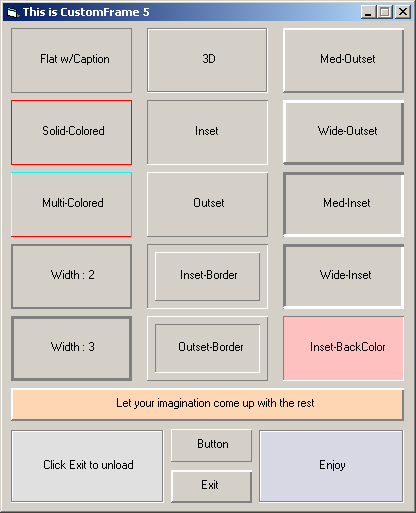
Simple, yet usefull CustomFrame Choose From 3D, Inset, Outset, Flat, Multi-Color etc... Updated
by Serge_G (9 Submissions)
Category: Custom Controls/Forms/Menus
Difficulty: Intermediate
Date Added: Wed 3rd February 2021
Rating: (4 Votes)

Relatively simple, yet usefull control. I made this control becuase I constantly found myself putting together lines to make a raised/sunken frame effect. So, I decided to make a frame that can be customized to my needs, and besides, I need to learn how to make controls. This control's properties can be changed at design time as well as run time. Chande 3D/Flat, BackGround, Caption, Solid-Colored, Multi-Colored, Raised, Sunken and customizable border width(1-3). Handles Click/MouseDown-Up-Move events, and can be easily made into a button, (if needed to be), let me know of any bugs, suggestions or comments becuase I am VERY new to building controls.
******Updated!, Can now be Opaque/Transparent. Changable at Design, authoring and run time... Thanks Anthony D for suggestion...

Rate Simple, yet usefull CustomFrame Choose From 3D, Inset, Outset, Flat, Multi-Color etc... Updated

Download Simple, yet usefull CustomFrame Choose From 3D, Inset, Outset, Flat, Multi-Color etc... Updated

Download Simple, yet usefull CustomFrame Choose From 3D, Inset, Outset, Flat, Multi-Color etc... Updated (5 KB)

Simple, yet usefull CustomFrame Choose From 3D, Inset, Outset, Flat, Multi-Color etc... Updated Comments

No comments have been posted about Simple, yet usefull CustomFrame Choose From 3D, Inset, Outset, Flat, Multi-Color etc... Updated. Why not be the first to post a comment about Simple, yet usefull CustomFrame Choose From 3D, Inset, Outset, Flat, Multi-Color etc... Updated.

Post your comment

Subject:
Message:
0/1000 characters