Simple Progressbar
Glenn C.
(3 Submissions)
Custom Controls/Forms/Menus
Visual Basic 3.0
Beginner
Wed 3rd February 2021
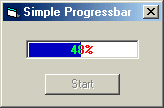
I've seen a lot of progress bar code on this site, but I haven't seen any that show you how to set up the caption so it will change color as the bar moves over it.
This is a very basic example of how to do that. The trick is setting the DrawMode to "Not Xor Pen"; you can also use "Merge Pen Not".
This example is only to get you started. You'll have to play around with the BackColor, ForeColor and RGB color used for the bar to get the color effect you want.
Have fun.
Rate Simple Progressbar
 (3(3 Vote))
(3(3 Vote))
Download Simple Progressbar
Active Server Pages
Coding Standards
Complete Applications
Custom Controls
Data Structures
Databases / ADO
DDE
Debugging & Errors
DirectX
Encryption
Files / I/O
Games
Graphics
Internet / HTML
Jokes / Humor
Libraries
Math / Dates
Office / VBA
Miscellaneous
OOP
OLE / COM / ActiveX
Registry
Sound / MP3
String Manipulation
VB Enhancements
Windows API
Windows CE
System Services