Shuffle/Rearrange Items in a listbox.
Gonzalo Ramirez
(1 Submission)
String Manipulation
Visual Basic 3.0
Intermediate
Wed 3rd February 2021
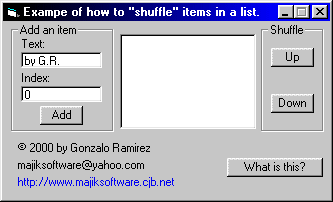
Demonstrates how to add an item to a listbox in any desired index. (i.e. Add an item between the 2nd and 3rd item in a listbox.)
Demonstrates how to shuffle/rearrange items in a listobx (i.e. Moving an item "up" or "down" the list at runtime).
Inputs
String to add to a listbox.
Index to determine where the new item will be added.
Assumes
This was coded in VB6 and works with VB5. I don't believe it will open in VB4, much less VB3, but the codeing concept should work with those versions.
Returns
Item added to the specified location.
Side Effects
[none]
API Declarations[none]
Rate Shuffle/Rearrange Items in a listbox.
 (5(5 Vote))
(5(5 Vote))
Download Shuffle/Rearrange Items in a listbox.
Active Server Pages
Coding Standards
Complete Applications
Custom Controls
Data Structures
Databases / ADO
DDE
Debugging & Errors
DirectX
Encryption
Files / I/O
Games
Graphics
Internet / HTML
Jokes / Humor
Libraries
Math / Dates
Office / VBA
Miscellaneous
OOP
OLE / COM / ActiveX
Registry
Sound / MP3
String Manipulation
VB Enhancements
Windows API
Windows CE
System Services