Set a PictureBox (including text) as the cursor
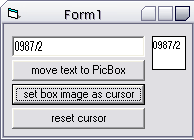
This example allows you to set the contents of a picturebox as the Mouse Icon (cursor). It uses the ImageList's ExtractIcon method to extract an icon, then it is simply set to the main form's MouseIcon property. Very easy to understand, all lines are commented.
Rate Set a PictureBox (including text) as the cursor
 (7(7 Vote))
(7(7 Vote))
Download Set a PictureBox (including text) as the cursor
Active Server Pages
Coding Standards
Complete Applications
Custom Controls
Data Structures
Databases / ADO
DDE
Debugging & Errors
DirectX
Encryption
Files / I/O
Games
Graphics
Internet / HTML
Jokes / Humor
Libraries
Math / Dates
Office / VBA
Miscellaneous
OOP
OLE / COM / ActiveX
Registry
Sound / MP3
String Manipulation
VB Enhancements
Windows API
Windows CE
System Services