SaverSwitch Screensaver Tray Control (Updated)
Dan Redding - Blue Knot Software
(14 Submissions)
Complete Applications
Visual Basic 5.0
Intermediate
Wed 3rd February 2021
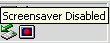
(NOTE: NEW BIGGER VERSION INCORPORATING ALL SUGGESTIONS AT https://www.vbcoders.com/vb/scripts/ShowCode.asp?txtCodeId=43915&lngWId=1 -- I'm leaning this version up for those who want the smaller, simpler app)
Small icon in the systray disables, enables or runs the screensaver with a click. Also has a menu item to open the display properties control panel to the screensaver tab.
Tested w/ Win2000 and XP; please let me know if there are any problems on other OS's.
Thanks to all the VBC community... I wouldn't know half the tricks I do if it weren't for all of you.
UPDATE: Added option to LoadAtStartup (Registry method) and save this setting to Registry [fixed].
Rate SaverSwitch Screensaver Tray Control (Updated)
 (3(3 Vote))
(3(3 Vote))
Download SaverSwitch Screensaver Tray Control (Updated)
Active Server Pages
Coding Standards
Complete Applications
Custom Controls
Data Structures
Databases / ADO
DDE
Debugging & Errors
DirectX
Encryption
Files / I/O
Games
Graphics
Internet / HTML
Jokes / Humor
Libraries
Math / Dates
Office / VBA
Miscellaneous
OOP
OLE / COM / ActiveX
Registry
Sound / MP3
String Manipulation
VB Enhancements
Windows API
Windows CE
System Services