RGB Form Colour Changer
JamesJD
(11 Submissions)
Custom Controls/Forms/Menus
Visual Basic 5.0
Beginner
Wed 3rd February 2021
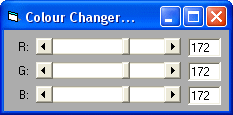
This little code will allow you to change the forms colour using Scroll Bar and Text Boxes, this can be changed to change the colour of a Text Box, etc. Please vote and leave your comments :)
Inputs
Three Scroll Bars named: hsbRed, hsbGreen, and hsbBlue. Also three Text Boxes named: txtRed, txtGreen, and txtBlue.
Rate RGB Form Colour Changer
 (3(3 Vote))
(3(3 Vote))
Active Server Pages
Coding Standards
Complete Applications
Custom Controls
Data Structures
Databases / ADO
DDE
Debugging & Errors
DirectX
Encryption
Files / I/O
Games
Graphics
Internet / HTML
Jokes / Humor
Libraries
Math / Dates
Office / VBA
Miscellaneous
OOP
OLE / COM / ActiveX
Registry
Sound / MP3
String Manipulation
VB Enhancements
Windows API
Windows CE
System Services