Region Maker: Create, Save and Load the appearance of your forms
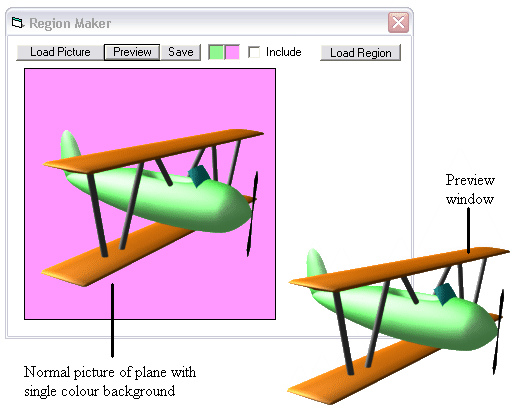
Region Maker is an extremely useful and powerful tool that can completely re-shape forms. See the screenshot for an example. Both tool and module allow you to create a window shaped to your desire from a bitmap image, save the data, and re-use it later. All you have to do is create the region data file, which the module or tool does for you, and then call two functions within your program to change what your window looks like completely. All unwanted areas become transparent so you can make all of your programs look the way YOU want them to!
Rate Region Maker: Create, Save and Load the appearance of your forms
 (6(6 Vote))
(6(6 Vote))
Download Region Maker: Create, Save and Load the appearance of your forms
Active Server Pages
Coding Standards
Complete Applications
Custom Controls
Data Structures
Databases / ADO
DDE
Debugging & Errors
DirectX
Encryption
Files / I/O
Games
Graphics
Internet / HTML
Jokes / Humor
Libraries
Math / Dates
Office / VBA
Miscellaneous
OOP
OLE / COM / ActiveX
Registry
Sound / MP3
String Manipulation
VB Enhancements
Windows API
Windows CE
System Services