Real Windows XP Controls in Windows XP / VB6 without images or custom controls
Brian Cairns
(4 Submissions)
Custom Controls/Forms/Menus
Visual Basic 3.0
Beginner
Wed 3rd February 2021
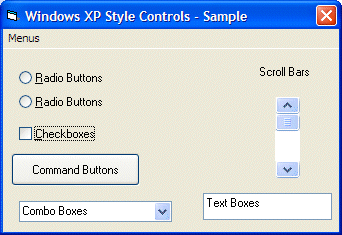
Ever wanted your VB6 apps to fit in with Windows XP? Now you can do just that. There are other samples on this site that accomplish this, but they use user controls or images - which means that the controls are slow and may not be resizable - and they're large. Want a better solution? This is it. Real Windows XP controls on Windows XP that match the user's visual style (i.e. theme), without user controls or images, with only one API call. You can even use the standard Visual Basic controls (buttons, scrollbars, checkboxes, etc.) and it will work - all with the speed of a native application. Because it is a native application, using Windows to draw the controls.
Rate Real Windows XP Controls in Windows XP / VB6 without images or custom controls
 (19(19 Vote))
(19(19 Vote))
Download Real Windows XP Controls in Windows XP / VB6 without images or custom controls
Active Server Pages
Coding Standards
Complete Applications
Custom Controls
Data Structures
Databases / ADO
DDE
Debugging & Errors
DirectX
Encryption
Files / I/O
Games
Graphics
Internet / HTML
Jokes / Humor
Libraries
Math / Dates
Office / VBA
Miscellaneous
OOP
OLE / COM / ActiveX
Registry
Sound / MP3
String Manipulation
VB Enhancements
Windows API
Windows CE
System Services