REAL Windows XP Command Buttons
Doctor Evil
(5 Submissions)
Custom Controls/Forms/Menus
Visual Basic 3.0
Intermediate
Wed 3rd February 2021
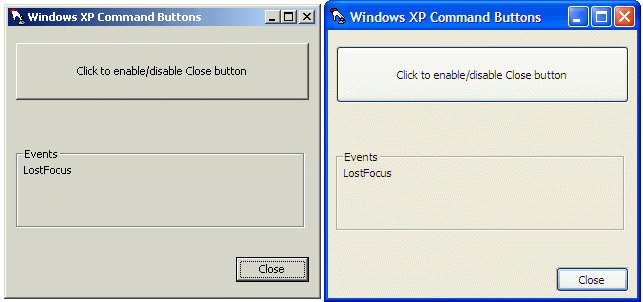
Did you know that VB 5/6 applications will not render their controls with the new visual themes under Windows XP? Obviously, this is not good. This is the solution to this problem. This creates a REAL themed button under Windows XP by calling the Theme APIs, all wrapped up into an easy to use control. All you have to do is drop this control in your forms in place of the regular command button. Plus, as an added bonus, this control is completely backwards compatible! If the OS that your program is running on does not support Themes (or if they are disabled), this control simply displays the standard command button, without any extra work by you. This will give your applications a truely professional touch!
Rate REAL Windows XP Command Buttons
 (7(7 Vote))
(7(7 Vote))
Download REAL Windows XP Command Buttons
Active Server Pages
Coding Standards
Complete Applications
Custom Controls
Data Structures
Databases / ADO
DDE
Debugging & Errors
DirectX
Encryption
Files / I/O
Games
Graphics
Internet / HTML
Jokes / Humor
Libraries
Math / Dates
Office / VBA
Miscellaneous
OOP
OLE / COM / ActiveX
Registry
Sound / MP3
String Manipulation
VB Enhancements
Windows API
Windows CE
System Services