Reading .wav files and outputting wave sample
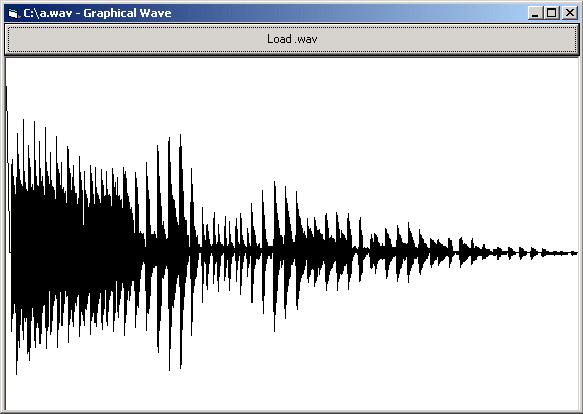
This code displays the waves (graphically) of a .wav file, just like in Windows' Sound Recorder
Inputs
Picture1
Picture2
Commondialog1
Command1
Returns
A graphical representation of a .wav file
API Declarations
Public Declare Function StretchBlt Lib "gdi32" (ByVal hdc As Long, ByVal X As Long, ByVal Y As Long, ByVal nWidth As Long, ByVal nHeight As Long, ByVal hSrcDC As Long, ByVal xSrc As Long, ByVal ySrc As Long, ByVal nSrcWidth As Long, ByVal nSrcHeight As Long, ByVal dwRop As Long) As Long
Rate Reading .wav files and outputting wave sample
(6(6 Vote))
Private Sub Command1_Click()
Dim LastX, LastY, CurX, CurY As Byte
CommonDialog1.ShowOpen
Form1.Caption = CommonDialog1.FileName & " - Graphical Wave"
If CommonDialog1.CancelError = True Or CommonDialog1.FileName = "" Then Exit Sub
'If the user pressed cancel or didn't select anything then exit this sub
On Error Resume Next
Picture1.Width = FileLen(CommonDialog1.FileName)
'Makes the invisible picturebox the width of the size of the .wav file
Open CommonDialog1.FileName For Binary As #1
Get #1, 44, LastY
'Gets the 44th byte of the .wav file (that is where the sound information that we are
'interested in starts)
LastX = 0
For i = 45 To FileLen(CommonDialog1.FileName)
'Loops through each byte (after 44) of the file
Get #1, i, CurY
Picture1.Line (LastX, LastY + 22)-(i, CurY + 22), 0
'Draws a line in the invisible picturebox using the data we read from the file
LastX = i
LastY = CurY
Next i
Close #1
StretchBlt Picture2.hdc, 0, 0, Picture2.ScaleWidth, Picture2.ScaleHeight, Picture1.hdc, 0, 0, Picture1.ScaleWidth, Picture1.ScaleHeight, vbSrcCopy
Picture2.Refresh
'This just copies the area of picture1 into picture2, so that you can see the whole Wave
End Sub
Private Sub Form_Load()
Form1.ScaleMode = vbPixels
Picture1.AutoRedraw = True
Picture1.ScaleMode = vbPixels
Picture1.Visible = False
Picture1.Height = 300
Picture1.BackColor = vbWhite
Picture2.AutoRedraw = True
Picture2.ScaleMode = vbPixels
Command1.Caption = "Load .wav"
CommonDialog1.Filter = "Wave Files (.wav) | *.wav"
End Sub
Private Sub Form_Resize()
Picture2.Move 0, Command1.Height, Form1.ScaleWidth, Form1.ScaleHeight
Command1.Move 0, 0, Form1.ScaleWidth, Command1.Height
'Stretches the visible picturebox and the commandbutton to fit the form
End Sub
Reading .wav files and outputting wave sample Comments
No comments yet — be the first to post one!
Post a Comment