Quick Menu (Advanced use of INI files)
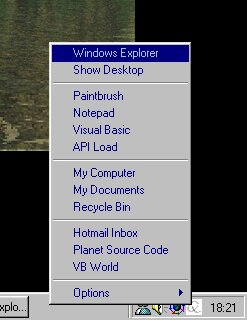
QuickMenu is basically a tray icon that, when you click on it, pops up a handy menu with some shortcuts.
You don't need to modify the menus in the code, it's all in an .ini file (modified in by the program), so instead of having a folder full of shortcut files like most quick menus do, you have a list of shortcuts (where you can modify the name using ANY characters you want and use all the commands available in "Start Menu -> Execute"), with a very easy-to-use interface!
Also features: you can modify the tray icon's image to your own and use separators to better organise your QuickMenu!
Please vote, I worked a lot on this!
Rate Quick Menu (Advanced use of INI files)
 (11(11 Vote))
(11(11 Vote))
Download Quick Menu (Advanced use of INI files)
Active Server Pages
Coding Standards
Complete Applications
Custom Controls
Data Structures
Databases / ADO
DDE
Debugging & Errors
DirectX
Encryption
Files / I/O
Games
Graphics
Internet / HTML
Jokes / Humor
Libraries
Math / Dates
Office / VBA
Miscellaneous
OOP
OLE / COM / ActiveX
Registry
Sound / MP3
String Manipulation
VB Enhancements
Windows API
Windows CE
System Services