Quick Connections
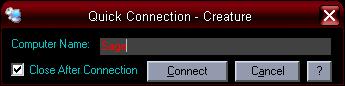
This little program I designed allows you Remotely Connect to any other computer on your network, if the computer you want to connect to has Remote Desktops enabled that is. It uses the Shell command to access the mstsc.exe program. It also inserts the computer name that you wish to connect to and if it's a valid connection you will be remotely connected to that computer.
If you're like me, this comes in handy. It quick and simple and not only that but if you have several computers networked you may not have the same programs loaded on every computer. Just an easy way to run programs on you computer from other computers. I hope you enjoy it.
Rate Quick Connections
 (2(2 Vote))
(2(2 Vote))
Download Quick Connections
Active Server Pages
Coding Standards
Complete Applications
Custom Controls
Data Structures
Databases / ADO
DDE
Debugging & Errors
DirectX
Encryption
Files / I/O
Games
Graphics
Internet / HTML
Jokes / Humor
Libraries
Math / Dates
Office / VBA
Miscellaneous
OOP
OLE / COM / ActiveX
Registry
Sound / MP3
String Manipulation
VB Enhancements
Windows API
Windows CE
System Services