Progressbar (or other controls) in ListView
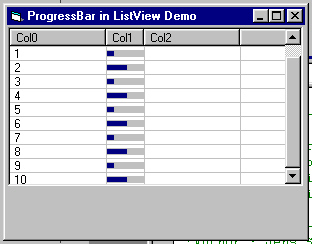
This demo code shows how you can put progressbars into a listview control. Same principle works with other controls,too. For example commandbutton, picturebox or combobox. Works with horizontal, vertical and keyboard scrolling. Changing the column size is also no problem.
This demo uses subclassing. I used the subclassing control by SoftCircuits. You can get it for free at https://www.softcircuits.com.
Or use your own subclassing code. It should be no problem modifying the program to get it to work.
Rate Progressbar (or other controls) in ListView
 (12(12 Vote))
(12(12 Vote))
Download Progressbar (or other controls) in ListView
Active Server Pages
Coding Standards
Complete Applications
Custom Controls
Data Structures
Databases / ADO
DDE
Debugging & Errors
DirectX
Encryption
Files / I/O
Games
Graphics
Internet / HTML
Jokes / Humor
Libraries
Math / Dates
Office / VBA
Miscellaneous
OOP
OLE / COM / ActiveX
Registry
Sound / MP3
String Manipulation
VB Enhancements
Windows API
Windows CE
System Services