Print to Wallpaper
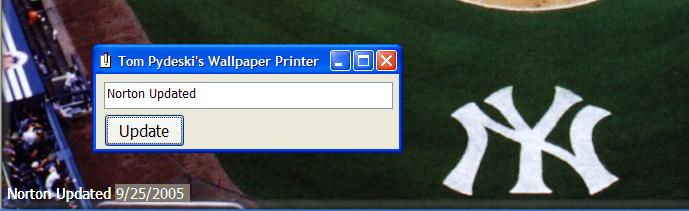
This program will print text onto the Desktop Wallpaper file and make the new picture file the desktop wallpaper.
The name of the wallpaper file is retrieved from the registry and the picture is loaded
into an image control to resize it to fit the screen size. The image is then BitBlt'd
into a picture control, where the desired message is printed to the image in the lower
left hand corner. The modified picture is then saved to a temp file (so as not to modify
the original file). The temp file is then set as the new wallpaper.
Inputs
The message you want to print on the wallpaper
Rate Print to Wallpaper
 (3(3 Vote))
(3(3 Vote))
Download Print to Wallpaper
Active Server Pages
Coding Standards
Complete Applications
Custom Controls
Data Structures
Databases / ADO
DDE
Debugging & Errors
DirectX
Encryption
Files / I/O
Games
Graphics
Internet / HTML
Jokes / Humor
Libraries
Math / Dates
Office / VBA
Miscellaneous
OOP
OLE / COM / ActiveX
Registry
Sound / MP3
String Manipulation
VB Enhancements
Windows API
Windows CE
System Services