Picture to Text (Update to Icon to Text)
Jay Kreusch
(6 Submissions)
Complete Applications
Visual Basic 3.0
Intermediate
Wed 3rd February 2021
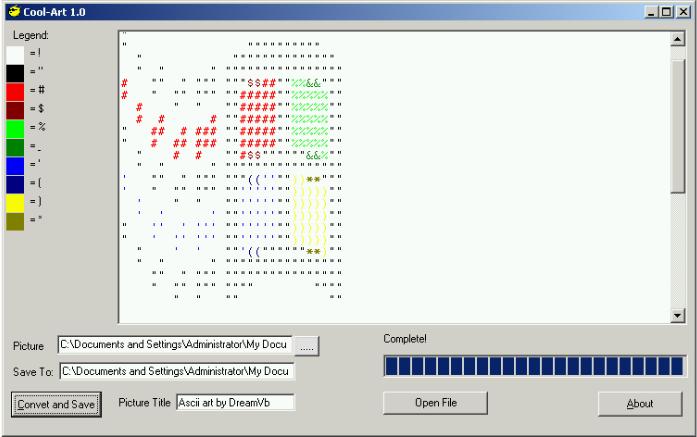
This code is an update to the Icon to Text converter submitted by Ben Jones. I have posted this with his permission. Please visit his website at:
https://www.codearchive.com/~dreamvb
If you like it, please vote. Anyway, This update adds the following abilities:
- Ability to convert any image insertable into a picturebox. I.E. JPG, GIF, BMP, WMF, ICO.
- Large picture support. Will support text files with widths up to 22 inches without word wrapping, larger with word wrapping.
- Character support for up to 223 colors
- Full-color text display using richtextbox control. (Now saves to rtf, but you can comment out that option)
- Color legend to show mappings (Uses dynamic control loading)
Requires RichTextbox control for rtf previewing, Windows common controls 6.0 for progressbar.
Produces RTF text picture with color legend. My girlfriend uses this for cross-stitch patterns.
However, Color is limited to 223 colors(character set 33-255) However, I've had great success in converting jpgs to 256 color bitmaps prior to converting to text.
Basically, I have changed Ben's conversion logic to an array of colors with indexes equal to ascii character codes.
Rate Picture to Text (Update to Icon to Text)
 (11(11 Vote))
(11(11 Vote))
Download Picture to Text (Update to Icon to Text)
Active Server Pages
Coding Standards
Complete Applications
Custom Controls
Data Structures
Databases / ADO
DDE
Debugging & Errors
DirectX
Encryption
Files / I/O
Games
Graphics
Internet / HTML
Jokes / Humor
Libraries
Math / Dates
Office / VBA
Miscellaneous
OOP
OLE / COM / ActiveX
Registry
Sound / MP3
String Manipulation
VB Enhancements
Windows API
Windows CE
System Services