Photoshop style progress bar in 1 function
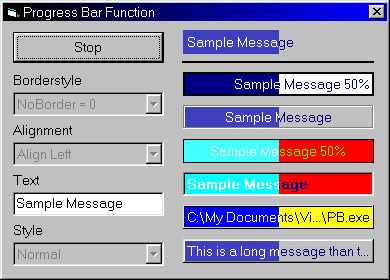
This one method will create a very flexible photoshop style Progress bar. The method uses many api functions and demonstrates some advanced graphic techniques such as using memory dc,bitmaps and win32 fontobjects. You can simply drop this function into your project and create a progress bar on anything (even a printer). The P.B. has a variety of borders and the text can supports end ellipses and file path shortening.
Assumes
Due the large number of declarations required. I have put the method into a class so that it can be kept together.
API DeclarationsToo many to mention
Rate Photoshop style progress bar in 1 function
 (8(8 Vote))
(8(8 Vote))
Active Server Pages
Coding Standards
Complete Applications
Custom Controls
Data Structures
Databases / ADO
DDE
Debugging & Errors
DirectX
Encryption
Files / I/O
Games
Graphics
Internet / HTML
Jokes / Humor
Libraries
Math / Dates
Office / VBA
Miscellaneous
OOP
OLE / COM / ActiveX
Registry
Sound / MP3
String Manipulation
VB Enhancements
Windows API
Windows CE
System Services