Phantom Panel Selector (Updated 17/07/2005)
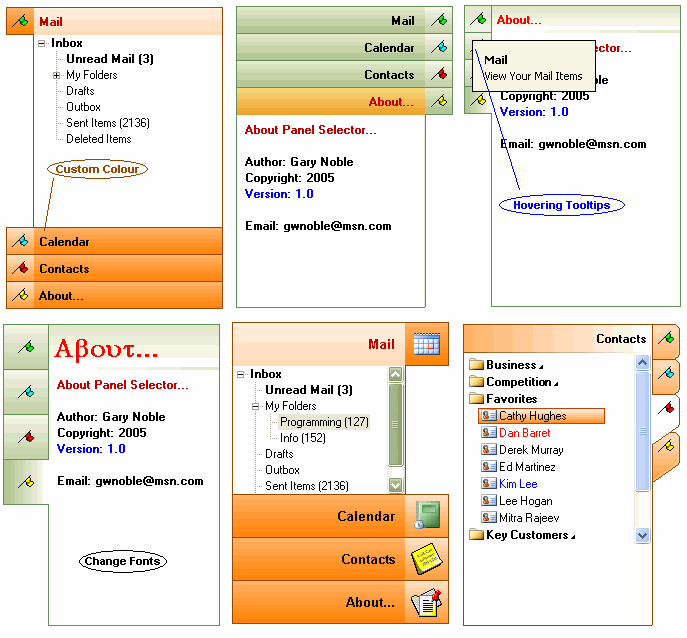
A Fully Owner Drawn Dependency Free Side Panel Selector Control, With Three Different Drawing Styles: Standard, StandardX And Simulated MSN Messenger Styles.
Various Options Include: Show Tooltips,Tooltip Style, Custom Color, Left To Right Support etc...
Add Different Controls To Each Panel.
Thanks Goto: Vlad For His Drawing Class and Paul Caton For His Awesome subclassing Code.
Take A Look At The Screen Shot I think It Speaks For Its Self.
As Always Constructive Comments And Critisims Are Welcome.
Gary.
_____________________________________________________
Updated:12/07/2005
- Added Mask Color For Icons/Pictures
- ReStructured The Messenger Style Drawing Routine.
- Messenger Style Panel Rect Bug Fix.
_____________________________________________________
Updated: 15/07/2005
Minor Cosmetic Changes: When In Messenger And Standard Drawstyle The Bottom Righthand Of The Control Was Missing A Pixel.
Embedded Control Height Was Wrong Height, When In Messenger Draw Style (Height Was Not To Exact Scale When You Resized The Icons)
Cleaned Up Code A little And Set Version to V1.02
_____________________________________________________
Updated: 17/07/2005 : Very Minor Change, Changed The Transparent Backcolor Of The Selected Panel.
When Drawing In Messenger Style. (Thanks Goto
Riccardo Cohen For Pointing Out This Bug)
_____________________________________________________
 (45(45 Vote))