Owner Drawn Menu for use with images like office
gerald nt
(1 Submission)
Custom Controls/Forms/Menus
Visual Basic 5.0
Intermediate
Wed 3rd February 2021
Customize your menu with images.
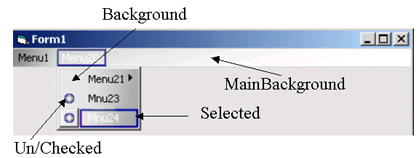
Just create a menu with the VB Menu editor. Add some PictureBoxes to your form and assign to the CMenu class.
This class uses the whole region of the main-menu not only the regions of the items. So, if the window width changes, the background image of the main-menu also does.
The screenshot shows where PictureBoxes are applied.
UPDATE:
Now using a better method for subclassing. A MsgBox blocked the WM_DRAWITEM message when running in the IDE and as long as the msgbox was on top, the menubar was grey. This doesn't happen in the new version.
Rate Owner Drawn Menu for use with images like office
 (5(5 Vote))
(5(5 Vote))
Download Owner Drawn Menu for use with images like office
Active Server Pages
Coding Standards
Complete Applications
Custom Controls
Data Structures
Databases / ADO
DDE
Debugging & Errors
DirectX
Encryption
Files / I/O
Games
Graphics
Internet / HTML
Jokes / Humor
Libraries
Math / Dates
Office / VBA
Miscellaneous
OOP
OLE / COM / ActiveX
Registry
Sound / MP3
String Manipulation
VB Enhancements
Windows API
Windows CE
System Services