OnMouseOver Hoverbuttons only need one line of code to workkeep your code clearly with this
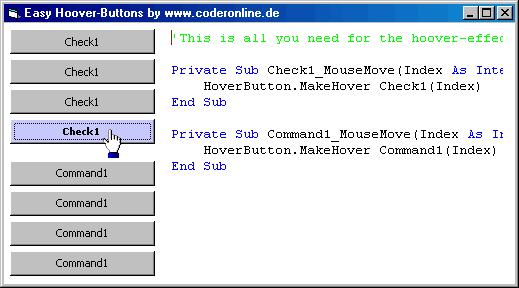
To improve the look of your application you might wish to have hooverbuttons.
-You think you'll need many codelines for each button and so many lines would make your code unclearly for you?
>> Download the solution for your problem here. You'll only need one line of code to make a Command-button, Checkbox-Button or even a picturebox being your individual Hooverbutton!
I really hope you like my solution! I have searched the internet for so long to find a solution like this- But there is none!
So please support my work and vote for me. thx!
API Declarationsincluded in zip-file:
uses GetCursorPos, WindowFromPoint, SetTimer and KillTimer-API
Rate OnMouseOver Hoverbuttons only need one line of code to workkeep your code clearly with this
 (13(13 Vote))
(13(13 Vote))
Download OnMouseOver Hoverbuttons only need one line of code to workkeep your code clearly with this
Active Server Pages
Coding Standards
Complete Applications
Custom Controls
Data Structures
Databases / ADO
DDE
Debugging & Errors
DirectX
Encryption
Files / I/O
Games
Graphics
Internet / HTML
Jokes / Humor
Libraries
Math / Dates
Office / VBA
Miscellaneous
OOP
OLE / COM / ActiveX
Registry
Sound / MP3
String Manipulation
VB Enhancements
Windows API
Windows CE
System Services