Net Watch V2.1 updated Measure connection (internet) speed REAL TIME
Net Watch V2.1(UPDATED)
-------------------------------------------------
UPdate 18/01 : Download / upload correction scale
Bug fixed setting upload/download
Try the application out !!
Bugs fixed , less overhead...
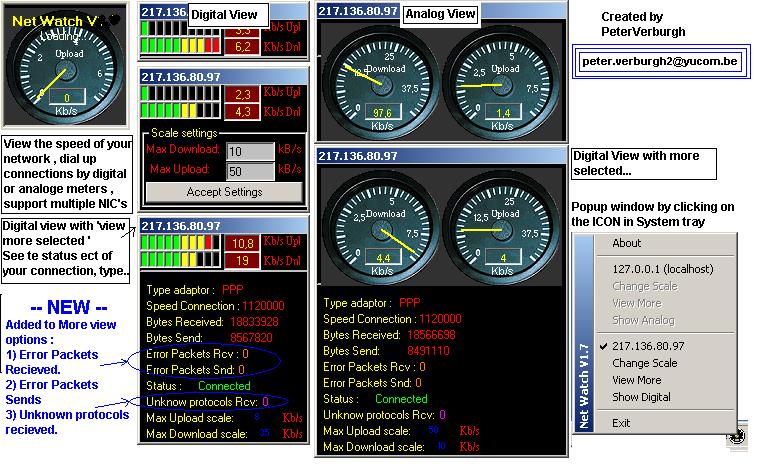
With this application you can see the data transfer on the adapters ( IP's )installed by your system. (including localhost!)
It will be visualized by an analoge/digital meters, you can see the adaptor type , connection speed , bytes recieved & sends.
You can also see the datatrafer/seconds.
By clicking on the ICON in tray , it will display an popupwindow ...
By clicking on the IP's in the popupwindow you can show or hide the analoge/digital meter.
You can input the maximum speed for upload & download in kB, then the scale will be automatic resized by using a control.
So if u are using example 1 networkcard & dial up modem or adsl , you can see per IP (adaptor) the speed , connection , connectionstatus ect..
By clicking on the 'Change scale ' it wil show or hide the scale partsettings.
By Clicking on the 'View more' it will show/hide the additional information about the ip adapter.
By Clicking on Digital/analoge it will change the skin !
****** Please VOTE for ME !! ******
if you have idea's to upgrade , problem , please email me !!
Greetings,
Peter Verburgh.
 (117(117 Vote))