- Home
·
- Graphics
·
- Must SEE Make all kinds of gradients, including DIAGONAL
Must SEE Make all kinds of gradients, including DIAGONAL
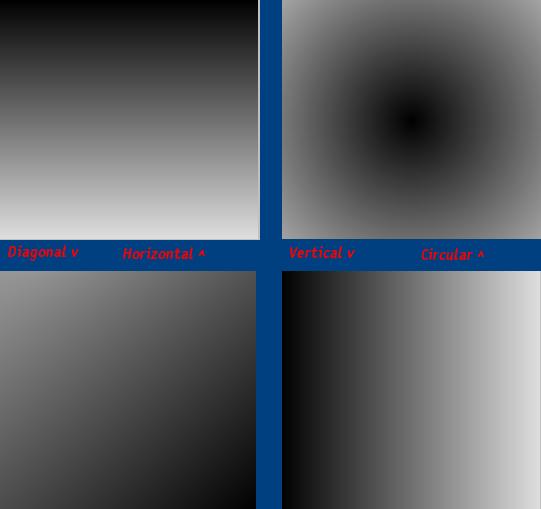
Look at the screen shot for all the possible gradients. You can choose the color, kind, and the end color. Worth checking out!
API Declarations
All coding by hand
Rate Must SEE Make all kinds of gradients, including DIAGONAL
 (3(3 Vote))
'Make all kinds of gradients
Function GradientMake(red As Integer, blue As Integer, green As Integer, endcolor As Integer, fill As Integer, Optional X As Integer, Optional Y As Integer)

 'The object- tested with picture boxes too
 Set gradienta = Me

 'Choose the fill type
 Select Case fill

  'Horizontal
  Case 1

   'Draw a line with color decreasing each time
   For i = 0 To gradienta.ScaleHeight - 1

    'This chooses the color decrease amount
    grcomponent = i * endcolor / gradienta.ScaleHeight

    'This chooses the color for the line
    rgbcolor = RGB(grcomponent + red, grcomponent + green, grcomponent + blue)

    'Draw the next line
    gradienta.Line (0, i)-(gradienta.ScaleWidth - 1, i), rgbcolor

   'Now get ready for the next line
   Next

  'Vertical
  Case 2

   'Draw a line with color decreasing each time
   For i = 0 To gradienta.ScaleWidth - 1

    'This chooses the color decrease amount
    grcomponent = i * endcolor / gradienta.ScaleWidth

    'This chooses the color for the line
    rgbcolor = RGB(grcomponent + red, grcomponent + green, grcomponent + blue)

    'Draw the next line
    gradienta.Line (i, 0)-(i, gradienta.ScaleWidth - 1), rgbcolor

   'Now get ready for the next line
   Next

  'Circular
  Case 3

   'If no optional Y then set it to the middle
   If Y = 0 Then Y = gradienta.ScaleHeight / 2

   'If no optional X then set it to the middle
   If X = 0 Then X = gradienta.ScaleWidth / 2

   'if there was an optional X then set the difference so the gradient takes up the area used
   If X <> (gradienta.ScaleWidth / 2) Then xx = X + ((gradienta.ScaleHeight / 2) - X)

   'if there was an optional Y then set the difference so the gradient takes up the area used
   If Y <> (gradienta.ScaleHeight / 2) Then xy = Y + ((gradienta.ScaleWidth / 2) - Y)

   'Draw a circle with color decreasing each time
   For i = 0 To gradienta.ScaleHeight + xx + xy

    'This chooses the color decrease amount
    grcomponent = i * endcolor / gradienta.ScaleHeight

    'This chooses the color for the line
    rgbcolor = RGB(grcomponent + red, grcomponent + green, grcomponent + blue)

    'Draw the next circle
    gradienta.Circle (X, Y), i, rgbcolor

   'Now get ready for the next circle
   Next

  Case 4

   'initialize xx
   xx = 1

   'Use pathagrian's therom to find the diaginal of the area used
   pathagrian = Sqr((gradienta.ScaleHeight * gradienta.ScaleHeight) + (gradienta.ScaleWidth * gradienta.ScaleWidth))

   'Draw a line with color decreasing each time
   For i = 0 To pathagrian

    'set the X point for the diganal line
    xc = (gradienta.ScaleWidth - i) * 2

    'set the Y point for the diganal line
    xd = (gradienta.ScaleHeight - i) * 2

    'This chooses the color decrease amount
    grcomponent = i * endcolor / pathagrian

    'This chooses the color for the line
    rgbcolor = RGB(grcomponent + red, grcomponent + green, grcomponent + blue)

    'Draw the next line
    gradienta.Line (xc, 0)-(0, xd), rgbcolor

   'Now get ready for the next line
   Next

 'end the select case for the fill type
 End Select

End Function
Must SEE Make all kinds of gradients, including DIAGONAL Comments
No comments yet — be the first to post one!
Post a Comment