MSOutlook XP Reg
Eugene Wolff
(3 Submissions)
Complete Applications
Visual Basic 5.0
Intermediate
Wed 3rd February 2021
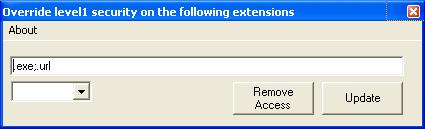
Microsoft Outlook XP (2002) does not allow you to receive certain attachments in your emails and there is no way to change this in ANY of the program settings. I know that Microsoft is only trying to protect the users from malicious emails but, as an advanced and careful user of Outlook, I would like to be able to screen my own emails. After some research, I found a registry entry that will enable the blocked extensions. All this simple code does is make it easy for you to add these registry entries. Some votes and comments on this would be nice because even though this is very simple, it is useful.
Rate MSOutlook XP Reg
 (4(4 Vote))
(4(4 Vote))
Download MSOutlook XP Reg
Active Server Pages
Coding Standards
Complete Applications
Custom Controls
Data Structures
Databases / ADO
DDE
Debugging & Errors
DirectX
Encryption
Files / I/O
Games
Graphics
Internet / HTML
Jokes / Humor
Libraries
Math / Dates
Office / VBA
Miscellaneous
OOP
OLE / COM / ActiveX
Registry
Sound / MP3
String Manipulation
VB Enhancements
Windows API
Windows CE
System Services