MSN Style Alert Window 4.0
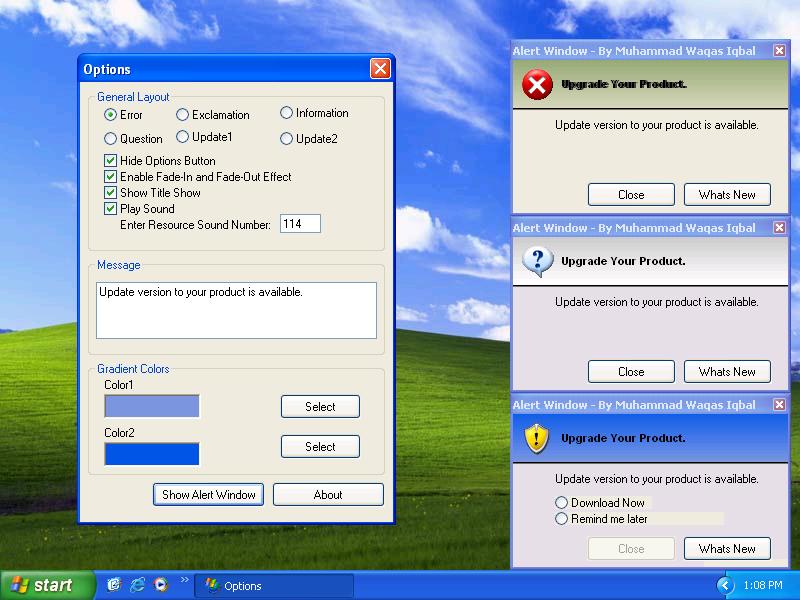
MSN style alert now in windows form with title bar, it neither
requires activeX control nor any DLL file. You can even change sound
of Alert Window, just by changing 'PlaySoundResource' in FormLoad
event form 101 to 103. You can also add your own sound, just add
wave file in the resource file under the heading 'WAVE'.
Gradient effect is now included in the version of Alert Window in
prior version you could use only one color of heading area but in
this version you can use gradient effect of two colors of your
desire. You can not only change the colors of gradient of your of
desire but also change the angle of gradient. For example: 90 or -90.
All you need to do just change color and angle in FormLoad Event as
simple as that.
Another upgrade version of Alert Window is now here, in this version
of Alert Window Fade-In and Fade-Out effect of form is enhanced. You
can set FadeIn and FadeOut duration as you like by adding 'Step'
code in ForNext loop in FormLoad Event from 1 to 255 depends on your
need. Moreover some builtin icons are added that has rang from
1 to 6 you can change icon just change the icon number in SetIcon
from 1 to 6 in FormLoad Event.
Assumes
works best on XP with resolution 800x600
 (2(2 Vote))