Message Box Generator
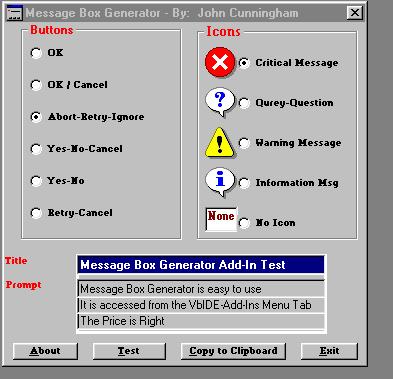
VB6.0 IDE Add-In, automatically generates Message
Boxes for your programs.
Inputs
Title; Message; Icon - Copy to Clipboard
Assumes
Message Box Generator is a DLL. See the Readme
file to install. Once installed the Message Box Generator is availabel through the VB6.0 IDE. Go to the IDE's Menu Bar, select Add-Ins, select Add-In Manager, select Message Box Generator and check
Loaded/Unloaded and Load on Start Up. The Message
Box Generator will then be available from the Add-Ins menu.
Returns
Completed Message Box Code - Paste into your program from the Clipboard
Rate Message Box Generator
 (4(4 Vote))
(4(4 Vote))
Download Message Box Generator
Active Server Pages
Coding Standards
Complete Applications
Custom Controls
Data Structures
Databases / ADO
DDE
Debugging & Errors
DirectX
Encryption
Files / I/O
Games
Graphics
Internet / HTML
Jokes / Humor
Libraries
Math / Dates
Office / VBA
Miscellaneous
OOP
OLE / COM / ActiveX
Registry
Sound / MP3
String Manipulation
VB Enhancements
Windows API
Windows CE
System Services