Memory Bar 1.5b
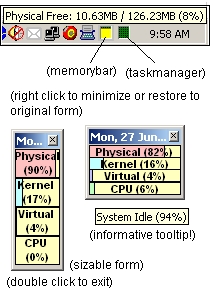
This is an improved version of the "small, neat and simple Memory Bar" app i submitted several days back. I have squeezed the app size 50% smaller than the previous version. full details of each bar is only displayed in the tooltiptext of each respective label. since windows time is already in the system tray, i chose to added a date caption to complement it. same as before, double click to close it, u can resize it however you want, and it stays on top of your apps. if there's any request to add more stuffs to it, i might consider an upgrade for further version.
Codes on cpu usage comes from:-
https://www.VBCode.com/vb/scripts/ShowCode.asp?txtCodeId=27505&lngWId=1
*Version 1.4: Fixed the picHook visible to false.
*Version 1.5: Added minimize to tray function (source comes from allapi.net)
*Version 1.5b: Some ppl complained that the program crashed (runtime error) after running for a prolonged period (division by zero?), so i added a 'on error resume next' for the timer. i know it isnt good practice but some ppl actually wanted to run this on their desktop for a long time.
 (5(5 Vote))