Masking Utility
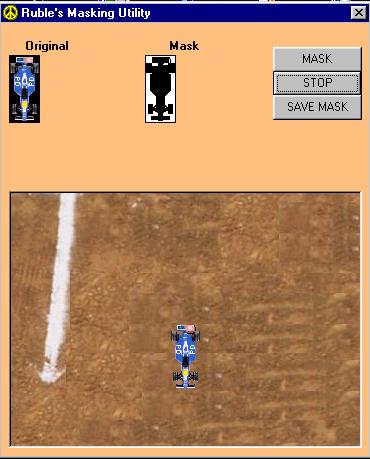
This is my first submission. This program takes a picture and makes a
mask image of it providing the mask color is black. After the mask is
created you can test your mask on the spot and save the mask for future
use. This code has examples of get/set pixel, BitBlt API functions. It
also has an example of how to use the CommonDialog control.
Read the nfo in the module and form declaration section
I have also provided some sample images to show how they are to be done.
Please feel free to leave me your comments, suggestions, and bugs.
Rate Masking Utility
 (3(3 Vote))
(3(3 Vote))
Download Masking Utility
Active Server Pages
Coding Standards
Complete Applications
Custom Controls
Data Structures
Databases / ADO
DDE
Debugging & Errors
DirectX
Encryption
Files / I/O
Games
Graphics
Internet / HTML
Jokes / Humor
Libraries
Math / Dates
Office / VBA
Miscellaneous
OOP
OLE / COM / ActiveX
Registry
Sound / MP3
String Manipulation
VB Enhancements
Windows API
Windows CE
System Services