VBcoders Guest


Don't have an account yet? Register


Forgot Password?


Linking VB6 like VC6

by Udi Shitrit (3 Submissions)
Category: Complete Applications
Compatability: Visual Basic 3.0
Difficulty: Intermediate
Date Added: Wed 3rd February 2021
Rating: (3 Votes)

Include VB5 Support
Explain How to create(Link) a different App/Dll(real dll)/vxd/mips applic/WinCe applic All in VB6

Rate Linking VB6 like VC6

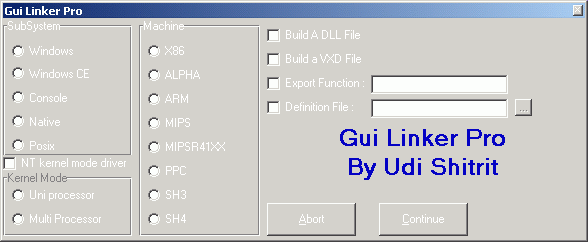
The Linker is 
Here

You can make a differnt linking to your project's in vb6 -
 
e.g : you can make a project with the statment in a module or form :


public function msgtest() as long 

msgtest=msgbox("Hello DLL",vbokonly,"msgbox")

end function

and use the "Make EXE" in the file menu to link the project,

at the end of the compilation process you will see the "linker pro", now you can choose the "Export" and the function name is: "msgtest"
and you should choose the "DLL" option 

now click the continue button and you will see your new file (dll file,if the extension is exe just rename it)
 and if you will look for its export function (dependency viewer) you will be happy to find that your new dll is exporting the function msgtest...


 to download the linker just click here


if you cannot download the file directly ,you can enter here to download it : Udi's Site


i.e.

 
you just need to rename your "link.exe" in the vb folder to something else ("link.org" or something) and to put the downloaded file "link.exe" instead.


Enjoy it 


Udi S.


Download this snippet    Add to My Saved Code

Linking VB6 like VC6 Comments

No comments have been posted about Linking VB6 like VC6. Why not be the first to post a comment about Linking VB6 like VC6.

Post your comment

Subject:
Message:
0/1000 characters