IsCombo 3 (Image) Combo) Updated
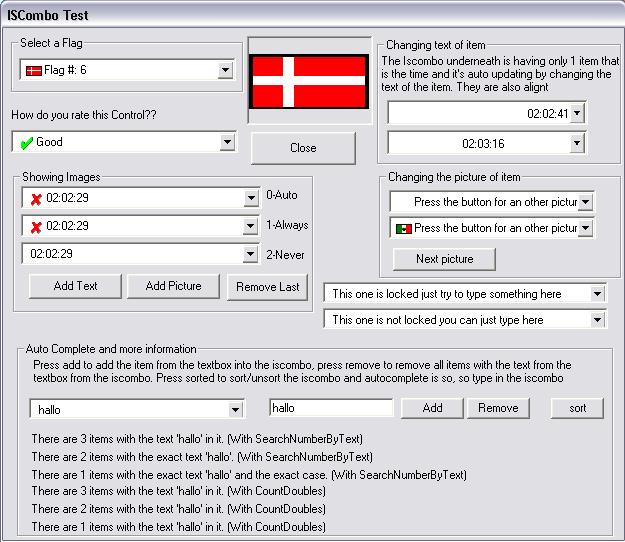
Need a good (Image)Combo, then download this IScombo.
Why did I make this.
I was working on a projekt an needed the imagecombo. But I found out that with some characters it worked strange, so
I started looking for a better one. I found the IScombo from Alfredo Córdova Pérez ( fred_cpp ). I thought the beginning was good so I started to enhance. Now I think I have done my job
well.
Just Check it out and vote for me. You may use it freely and adjust, but just give
Alfredo Córdova Pérez and me credit, cause we worked hard for it.
Just check it out and have fun with it. I never gonna use another one anymore !!
If you don't think it's good just tell me why.
(It might have some little bugs (It isn't completly tested) but if you find
one just let me know so I can fix it. But I don't think there are many.
Suggestion, errors etc are welcome at : [email protected])
I haven't put all option in the test form, but I think you guys can figure the rest out, it's very easy.
Assumes
Some Feautures:
- Autocomplete
- Adding Images
- Auto show Images (or choose Always or Never), this way it only pretends
to be an ImageCombo if you have inserted at least 1 image
- Removing items by number
- Removing Items by Text
- Sorted (and unsort to get it back the way it was)
- Changing the text of an item (instead of removing and adding the same at
the right place only with another text)
- Changing the picture of an item (instead of removing and adding the same at
the right place only with another picture)
- Locking
- Use Keyboard Keys
- Seraching for Text
- Count Doubles (for example count how much the word "hello"is in the
iscombo
- and much more, to much to tell all here
API DeclarationsNew and not in the samples:
Use the MaximumItems to tell how much items there may be in the iscombo.
-1 is infinit. You can even change it when the iscombo is already full.
For example if there are 10 items in and you change Maximumitems to 5
then there will be 5 removed according to your MaxEceeded for example if
that one said OverWriteFirst then the first 5 will be removed.
Use MaxExceeded to tell what happens when the MaximumItems will be exceeded.
For example: OverWriteFirst, DOntAdd, OverWriteLast or OverWriteRandom
Use AcceptDoubles to say if a user can add doubles in the box
Use CaseSensitiveAcceptDoubles to tell if Hello is the same as HEllo (watch the E).
Use Clear to clear the whole iscombo at once
 (4(4 Vote))