Internet Status
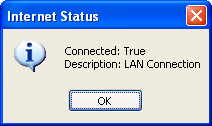
Determines if a connection to the internet has been established, also retrieves the type of connection. I recently submitted an article entry titled Internet Status. The methods in which I used to determine the same information was incorrectly used as I was miss-informed by ApiViewer 2002. I have resolved those problems.
PS. Don't ever depend on APIViewer for accurate Function declarations.
Rate Internet Status
 (5(5 Vote))
Private Declare Function InternetGetConnectedState Lib "wininet.dll" (ByRef lpdwFlags As Long, ByVal dwReserved As Long) As Integer
Private Const INTERNET_CONNECTION_PROXY = &H4
Private Const INTERNET_CONNECTION_CONFIGURED = &H40
Private Const INTERNET_CONNECTION_LAN = &H2
Private Const INTERNET_CONNECTION_MODEM = &H1
Private Const INTERNET_RAS_INSTALLED = &H10
Private Const INTERNET_CONNECTION_OFFLINE = &H20
Private Type tConnectionStatus
 Connected As Boolean
 ConnectionType As String
 RASInstalled As Boolean
End Type
'general declarations....
Private Function GetConnectionInfo(ConnectionStatus As tConnectionStatus) As Boolean
Dim pdFlags& 'Dimensionalize pdFlags as long data type
 If InternetGetConnectedState(pdFlags&, 0) Then
 'Call InternetGetConnectedState to initialize pdFlags with the current connection information flags
 GetConnectionInfo = True
 'InterNetGetConnectedState function was successful, return true
 If (pdFlags& And INTERNET_CONNECTION_PROXY) = INTERNET_CONNECTION_PROXY Then
'Perform a Bitwise And operation to determine if the variable pdFlags specifies the Internet_Connection_Proxy constant
 ConnectionStatus.ConnectionType = "Local system uses a proxy server to connect to the Internet."
'Initialize ConnectionStatus's ConnectionType member with the appropriate connection description
  ConnectionStatus.Connected = True
  'Initialize this structures Connected member
 End If
 If (pdFlags& And INTERNET_CONNECTION_CONFIGURED) = INTERNET_CONNECTION_CONFIGURED Then
  ConnectionStatus.Connected = True
  ConnectionStatus.ConnectionType = "Local system has a valid connection to the Internet, but it might or might not be currently connected."
 End If
  If (pdFlags& And INTERNET_CONNECTION_LAN) = INTERNET_CONNECTION_LAN Then
  ConnectionStatus.ConnectionType = "Local system uses a local area network to connect to the Internet."
  ConnectionStatus.Connected = True
  End If
  If (pdFlags& And INTERNET_CONNECTION_MODEM) = INTERNET_CONNECTION_MODEM Then
  ConnectionStatus.ConnectionType = "Local system uses a modem to connect to the Internet."
  ConnectionStatus.Connected = True
  End If
  If (pdFlags& And INTERNET_CONNECTION_OFFLINE) = INTERNET_CONNECTION_OFFLINE Then
  ConnectionStatus.ConnectionType = "Local system is in offline mode."
   ConnectionStatus.Connected = False
  End If
  If (pdFlags& And INTERNET_RAS_INSTALLED) = INTERNET_RAS_INSTALLED Then
   ConnectionStatus.RASInstalled = True
  End If
 End If
End Function
Private Sub Command1_Click()
Dim MyConnectionStatus As tConnectionStatus
'Dimensionalize MyConnectionStatus as user-defined type structure tConnectionStatus
 GetConnectionInfo MyConnectionStatus 'See this sub routine for more info...
 MsgBox "Connected: " & MyConnectionStatus.Connected & vbCrLf & "Type: " & MyConnectionStatus.ConnectionType
 'Show MsgBox modal dialog to display the connection info...
End Sub
Internet Status Comments
No comments yet — be the first to post one!
Post a Comment