How to Disable System Menues.
Girish Patil
(1 Submission)
Custom Controls/Forms/Menus
Visual Basic 5.0
Intermediate
Wed 3rd February 2021
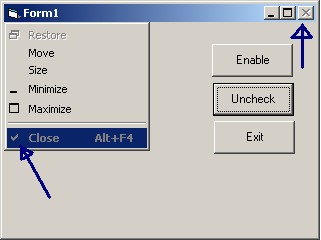
To disable form's system menues.(close,Min,Max)
API DeclarationsPrivate Declare Function GetSystemMenu Lib "user32" ( _
ByVal hwnd As Long, ByVal bRevert As Long) As Long
Private Declare Function GetMenuItemInfo Lib "user32" Alias _
"GetMenuItemInfoA" (ByVal hMenu As Long, ByVal un As Long, _
ByVal b As Boolean, lpMenuItemInfo As MENUITEMINFO) As Long
Private Declare Function SetMenuItemInfo Lib "user32" Alias _
"SetMenuItemInfoA" (ByVal hMenu As Long, ByVal un As Long, _
ByVal bool As Boolean, lpcMenuItemInfo As MENUITEMINFO) As Long
Private Declare Function SendMessage Lib "user32" Alias _
"SendMessageA" (ByVal hwnd As Long, ByVal wMsg As Long, _
ByVal wParam As Long, lParam As Any) As Long
Rate How to Disable System Menues.
 (4(4 Vote))
(4(4 Vote))
Download How to Disable System Menues.
Active Server Pages
Coding Standards
Complete Applications
Custom Controls
Data Structures
Databases / ADO
DDE
Debugging & Errors
DirectX
Encryption
Files / I/O
Games
Graphics
Internet / HTML
Jokes / Humor
Libraries
Math / Dates
Office / VBA
Miscellaneous
OOP
OLE / COM / ActiveX
Registry
Sound / MP3
String Manipulation
VB Enhancements
Windows API
Windows CE
System Services