Gradient Button v1.2.1
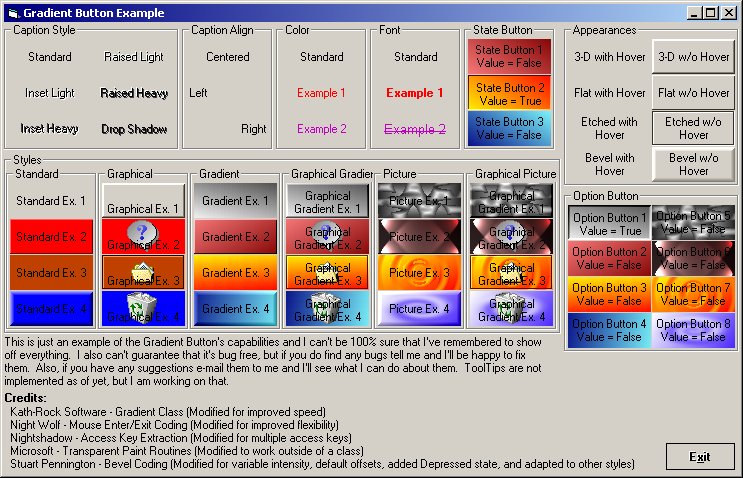
This button was created to be an enhanced replacement for Visual Basic's standard command button by adding 2 more Border appearance schemes, 2 more button styles, hover effects, 5 more caption styles, and state button compatibility. I cannot guarantee that this code is bug free although I have made every attempt to make it such. If you have any problems with this code please contact me and I'll do what I can to help you though the problem.
Release 1.1.0:
+ New
- 5 Caption Styles
- State Button Capability (sort of like a checkbox)
+ Fixed
- Bug in caption wrapping that would lose a character if a single "word" was longer than the caption width.
+ Improved
- Slight speed increase from de-coupling the caption wrapping and drawing.
Release 1.1.1:
+ Fixed
- Bug that would not re-process the caption for display if the caption was changed in code at run time, unless a refresh was done. (Bug introduced in Release 1.1.0)
Release 1.2.0:
+ New
- Added Picture and Graphical Picture modes
- Added Bevel Appearance Type
- Added Bevel Width and Intensity properties (for customizing the bevel border)
- Added UseClassicBorders property (to allow switching between blending and classic borders)
- Added Option Button Compatibility and changed the structure of the State Button compatibility some
+ Improved
- Borders have been revamped to allow blending with the gradient/picture on the button
+ Fixed
- Fixed a minor issue with the ValueChanged event (event would not fire if changed via code)
- Rewrote description text for properties / events / methods to be completely accurate
Release 1.2.1:
+ Fixed
- ToolTips are finally fixed and working. (I thought this important enough for another release just for this one issue)
 (16(16 Vote))