Frame buffered, all API, scrolling label control
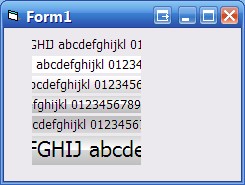
Labels where all the text doesn't fit due to space constraints. Gah! Here is the solution! Flexbible font face and size, several styles.
All API driven from font creation to frame buffering.
Inputs
Label scrolls when mouse move in the final 10 pixels.
where the caption is too long, '...' displayed.
Click on the label to stop and disable the scrolling.
dbl click to re enable the scrolling
backstyle flat, light and dark gradient, vista split gradient style.
any font and size.
API DeclarationsSetPixel SetRect FillRect CreateFont TextOut SetTextColor StretchDIBits BitBlt CreateCompatibleBitmap CreateCompatibleDC SelectObject GetDC DeleteDC DeleteObject SetBkMode
MulDiv GetDeviceCaps CreateBrushIndirect OleTranslateColor
Rate Frame buffered, all API, scrolling label control
 (3(3 Vote))
(3(3 Vote))
Download Frame buffered, all API, scrolling label control
Active Server Pages
Coding Standards
Complete Applications
Custom Controls
Data Structures
Databases / ADO
DDE
Debugging & Errors
DirectX
Encryption
Files / I/O
Games
Graphics
Internet / HTML
Jokes / Humor
Libraries
Math / Dates
Office / VBA
Miscellaneous
OOP
OLE / COM / ActiveX
Registry
Sound / MP3
String Manipulation
VB Enhancements
Windows API
Windows CE
System Services