Four Cool User Controls GGCommand, GGProgressBar, GGMover and GGCommonDialog
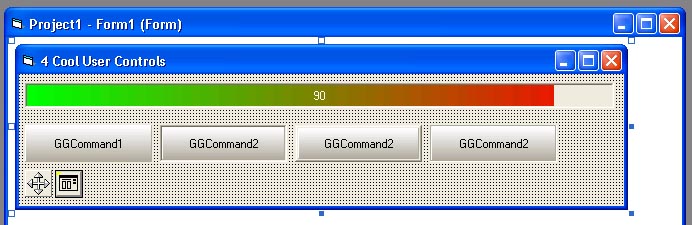
4 cool user controls. !!! FOR ADVANCED USERS ONLY !!! NO SAMPLE PROJECT INCLUDED !!! Experiment with Properties Browser and methods and events. Look at the great events of GGCommand (I have not seen a Flat Command Button like mine on VBC yet :)) - MouseEnter and MouseExit. Supports transparent images and Caption and Picture position adjustments.
Usage of GGMover:
In MouseDown events of some object (Picture1 for example - set form and picture1 .ScaleMode to 3-Pixel):
GGMover1.CaptureObject X,Y
In MouseMove event:
GGMover1.MoveObject Picture1,X,Y,True,True,0,300,0,500
In MouseUp event:
GGMover1.ReleaseTargetObject
If you have any problems with these user controls just write me an email to gogox@yahoo com or [email protected]
This is my first submission to VBC.Enjoy
Side Effects
Be carefull with GGCommonDialog - Set .Flags before using it for Fonts - Use GGCommonDialog1.Flags = cdlCFBoth
API DeclarationsA lot of API's in user control's source code.
 (6(6 Vote))