Formatted Label
RadimS
(1 Submission)
Custom Controls/Forms/Menus
Visual Basic 3.0
Intermediate
Wed 3rd February 2021
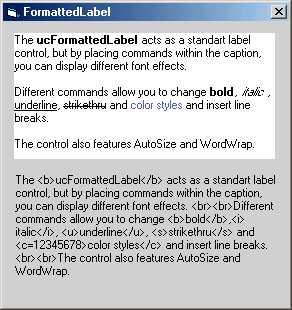
The FormattedLabel acts as a standart label control, but by placing commands within the caption, you can display different font effects.
Different commands allow you to change bold, italic, underline, strikethru and color styles and insert line breaks.
The control also features AutoSize and WordWrap.
But i can't do it with transparent background. Buuuu. :o)
Hi folks. I change tags to html like but without color tag. In declaration part of UserControl there is constants like
CONST cBoldStart = "
You can change tags there but they must by among < and >. Thanks to all for your reqest and tips.
p.s. I hope than my programing is better then my english. Sorry :o))))
Rate Formatted Label
 (14(14 Vote))
(14(14 Vote))
Download Formatted Label
Active Server Pages
Coding Standards
Complete Applications
Custom Controls
Data Structures
Databases / ADO
DDE
Debugging & Errors
DirectX
Encryption
Files / I/O
Games
Graphics
Internet / HTML
Jokes / Humor
Libraries
Math / Dates
Office / VBA
Miscellaneous
OOP
OLE / COM / ActiveX
Registry
Sound / MP3
String Manipulation
VB Enhancements
Windows API
Windows CE
System Services