Find if Process is Runing using Windows Management Instrurmentation (WMI)
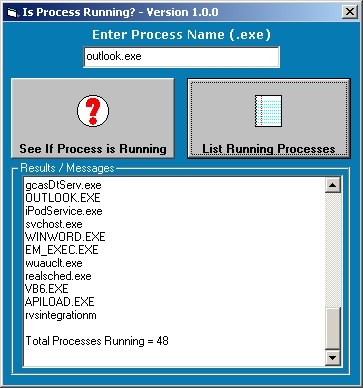
Simple function that uses Windows Management Instrurmentation (WMI) to find if Process (task) is running on your system. I used this to detect if pcAnywhere Host (awhost32.exe) was running before I had a Telephone Call Accounting System "Phone Home" using the modem. Then I use the same function to detect that awhost32.exe was stopped before using the modem. After my app was done with the modem and issued the restart of pcAnywhere, used the function to see that awhost32.exe had started. Also included in the sample app is a simple task list.
Rate Find if Process is Runing using Windows Management Instrurmentation (WMI)
 (7(7 Vote))
(7(7 Vote))
Download Find if Process is Runing using Windows Management Instrurmentation (WMI)
Active Server Pages
Coding Standards
Complete Applications
Custom Controls
Data Structures
Databases / ADO
DDE
Debugging & Errors
DirectX
Encryption
Files / I/O
Games
Graphics
Internet / HTML
Jokes / Humor
Libraries
Math / Dates
Office / VBA
Miscellaneous
OOP
OLE / COM / ActiveX
Registry
Sound / MP3
String Manipulation
VB Enhancements
Windows API
Windows CE
System Services