Fill Combo\List All Over
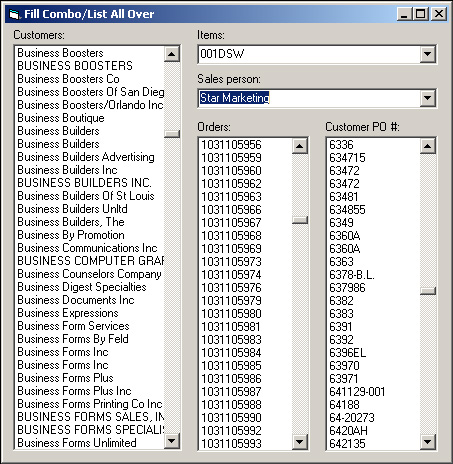
Use one generic sub to fill all comboboxes or listboxes on your form(s), with data pulled out from database.
Inputs
Tablename, fieldname, optional comboname, optional listboxname, optional orderbyfield
Assumes
This code is using ADO control, and uses two comboboxes and three listboxes on a form.
Returns
Fills combobox or listbox with data from database.
Rate Fill Combo\List All Over
 (4(4 Vote))
Option Explicit
'decalre connection and recordset
Dim myConn As ADODB.Connection
Dim myRecSet As ADODB.Recordset
Private Sub Form_Load()
Set myConn = New ADODB.Connection
Set myRecSet = New ADODB.Recordset
myConn.CursorLocation = adUseClient
'modify your connection string
myConn.Open "PROVIDER=Microsoft.jet.OLEDB.4.0;data source=C:\game.mdb;"
'modify with tablename, fieldname, optional comboname, optional listboxname, optional orderby
Call Fill_ComboAllOver("tablename", "fieldname", , List1, "fieldname")
'modify with tablename, fieldname, optional comboname, optional listboxname, optional orderby
Call Fill_ComboAllOver("tablename", "fieldname", Combo1) 'no orderby specified
'modify with tablename, fieldname, optional comboname, optional listboxname, optional orderby
Call Fill_ComboAllOver("tablename", "fieldname", Combo2, , "fieldname")
'modify with tablename, fieldname, optional comboname, optional listboxname, optional orderby
Call Fill_ComboAllOver("tablename", "fieldname", , List2, "fieldname")
'modify with tablename, fieldname, optional comboname, optional listboxname, optional orderby
Call Fill_ComboAllOver("tablename", "fieldname", , List3) 'no orderby specified
End Sub
Private Sub Form_QueryUnload(Cancel As Integer, UnloadMode As Integer)
myConn.Close
End Sub
Public Sub Fill_ComboAllOver(ByVal sbTableName As String, ByVal sbFieldName As String, _
    Optional ByRef comboName As ComboBox, Optional ByRef listName As ListBox, _
    Optional ByVal sbOrder As String)
On Error Resume Next
'if no orderby sepcified, use the fieldname instead
If sbOrder = "" Then sbOrder = sbFieldName
'clear the combo or the listbox
comboName.Clear
listName.Clear
'open recordset
DoEvents
 myRecSet.CursorLocation = adUseClient
 myRecSet.Open "SELECT " & sbFieldName & " FROM " & sbTableName & " order by " & sbFieldName & ";", myConn, adOpenKeyset, adLockReadOnly
  With myRecSet
  Do Until .EOF
   'fill combo or listbox
   comboName.AddItem .Fields(sbFieldName)
   listName.AddItem .Fields(sbFieldName)
  .MoveNext
  Loop
  End With
 myRecSet.Close
 Set comboName = Nothing
 Set listName = Nothing
End Sub
Fill Combo\List All Over Comments
No comments yet — be the first to post one!
Post a Comment