Easy Dos Control: Execute Dos Command & Capture Result
Eric Wolcott
(20 Submissions)
Custom Controls/Forms/Menus
Visual Basic 5.0
Intermediate
Wed 3rd February 2021
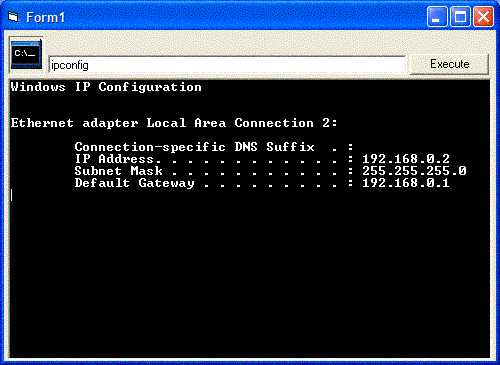
This is a very easy to use control. Example Code: 'Text2.Text = Text2.Text & DOS1.ExecuteCommand(Text1.Text)'. Thats all you have to do. You execute the command and it captures the result. Tell me how you like or what i need to do to make it better.
Rate Easy Dos Control: Execute Dos Command & Capture Result
 (12(12 Vote))
(12(12 Vote))
Download Easy Dos Control: Execute Dos Command & Capture Result
Active Server Pages
Coding Standards
Complete Applications
Custom Controls
Data Structures
Databases / ADO
DDE
Debugging & Errors
DirectX
Encryption
Files / I/O
Games
Graphics
Internet / HTML
Jokes / Humor
Libraries
Math / Dates
Office / VBA
Miscellaneous
OOP
OLE / COM / ActiveX
Registry
Sound / MP3
String Manipulation
VB Enhancements
Windows API
Windows CE
System Services