Easily Bind a Listview Control to a Table or SQL statement
Michael Wortman
(1 Submission)
Databases/Data Access/DAO/ADO
Visual Basic 3.0
Intermediate
Wed 3rd February 2021
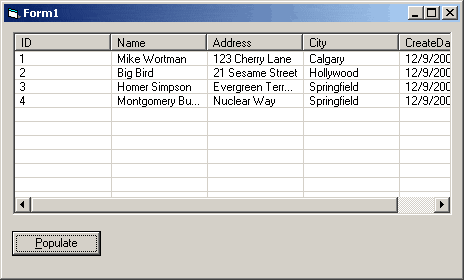
Allows you to automatically generate column headers and load all the records from a table or SQL statement into a listview.
Inputs
takes a listview control and a recordset as parameters
Assumes
assumes you have ADODB referenced in the project and are using at least VB6. can be tweeked to work with VB5 or less probably though.
Returns
nothing
Side Effects
none, let me know
API Declarationsnone, all standard calls & controls
Rate Easily Bind a Listview Control to a Table or SQL statement
 (8(8 Vote))
(8(8 Vote))
Download Easily Bind a Listview Control to a Table or SQL statement
Active Server Pages
Coding Standards
Complete Applications
Custom Controls
Data Structures
Databases / ADO
DDE
Debugging & Errors
DirectX
Encryption
Files / I/O
Games
Graphics
Internet / HTML
Jokes / Humor
Libraries
Math / Dates
Office / VBA
Miscellaneous
OOP
OLE / COM / ActiveX
Registry
Sound / MP3
String Manipulation
VB Enhancements
Windows API
Windows CE
System Services