Draw formated text, tables, pictures
UserXP
(4 Submissions)
Custom Controls/Forms/Menus
Visual Basic 5.0
Intermediate
Wed 3rd February 2021
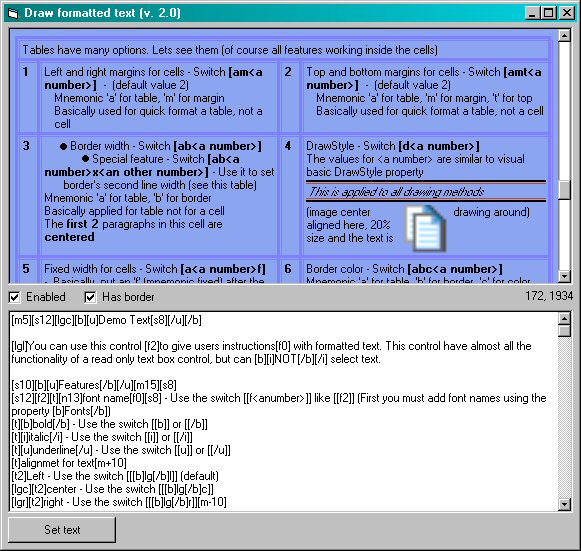
Draw formatted text (with any alignment), draw tables (double border), draw pictures (any alignment and inside cells)
You can use this control to give users instructions with formatted text. This control have almost all the functionality of a read only text box control, but can NOT select text.
Features:
alignment,
font name,
bold,
italic,
underline,
font size,
lines,
Bullets,
Colors,
Web links
Also, left margin for paragraphs. Line spacing and space before/after a paragrath.
Note: Also, you can set the margin for the second (and other) lines as well.
Draw images by path, by handle, by resource number with any alignment. Also text around images.
Draw tables and use all features inside cells.
Rate Draw formated text, tables, pictures
 (10(10 Vote))
(10(10 Vote))
Download Draw formated text, tables, pictures
Active Server Pages
Coding Standards
Complete Applications
Custom Controls
Data Structures
Databases / ADO
DDE
Debugging & Errors
DirectX
Encryption
Files / I/O
Games
Graphics
Internet / HTML
Jokes / Humor
Libraries
Math / Dates
Office / VBA
Miscellaneous
OOP
OLE / COM / ActiveX
Registry
Sound / MP3
String Manipulation
VB Enhancements
Windows API
Windows CE
System Services